

Most websites look healthy at first glance, but a lot can be going on behind the scenes.
Broken links, 404 errors, redirect loops, an AI bot blocked in your robots.txt — these issues don’t announce themselves.
A good SEO audit tool can catch them before they affect your traffic, leads, or revenue.
I’ve used these tools across years of SEO and content work.
To find the ones actually worth your time, I tested the top options and gathered input from SEOs who run audits every day.
The list below includes everything from free, no-login checkers to enterprise suites that crawl millions of pages.
Whether you’re running your first audit or your 100th, you’ll find the right one for you here.
Here’s how they compare.
What Are the Best SEO Audit Tools?
| SEO Audit Tool | Best For | Price |
|---|---|---|
| Google Search Console | Free monitoring of your site’s presence in Google search | Free |
| SEOptimer | Budget-friendly, high-level site audits | 1 free audit report per day; paid plans start at $29/month |
| Semrush’s Site Audit | Comprehensive technical + AI accessibility auditing | Free plan and trial available; paid plans start at $139.95/month |
| SE Ranking’s Website Audit | Tracking SEO audit progress across multiple sites or clients | Starts at $129/month; free trial available |
| Conductor Website Monitoring | Real-time monitoring of large, high-stakes sites | Custom pricing; free trial available |
| Screaming Frog | Customizable technical crawl analysis | Free up to 500 URLs; $279/year per license after that |
| BrightLocal | Local SEO auditing and tracking rankings block by block | Starts at $39/month for one location |
| Clearscope | Auditing and optimizing content for SEO and AI search | Starts at $129/month |
What to Look for in an SEO Audit Tool
SEO audit tools vary widely in depth, focus, and price.
Here are the most important capabilities to evaluate before choosing one:
- Comprehensive crawling: The tool should be able to crawl your entire website for technical errors. Check that the crawl limit exceeds the number of pages on your site before committing to a plan.
- Technical SEO analysis: Look for automated identification and prioritization of technical issues such as broken links, duplicate content, missing meta tags, and page speed problems. The best audit tools sort issues by severity so you know what to fix first.
- AI search readiness: AI-crawler access and technical signals such as structured data and internal linking.
- Actionable recommendations: Spotting issues is only half the job. Look for tools that tell you why an issue matters and how to fix it.
- Reporting and visualization: If you work with clients or a team, look for clear visual audit reports, PDF/CSV exports, and white-label options.
- Integration with other tools: The ability to connect to other SEO tools, such as Google Search Console (GSC) and Google Analytics, makes audit data more actionable.
With these qualities in mind, let’s look at why each tool made our list.
Free and Low-Cost Website Audit Tools
If you only need the basics, these free and low-cost SEO audit tools will do the trick.
Google Search Console
Best for monitoring your site’s indexing and search performance on Google
Price: Free

Google Search Console is a free tool that shows you data directly from Google.
It’s not a full audit tool, but it’s a handy companion to the other tools on this list.
Monitor Indexing and Site Performance on Google
With GSC, you can:
- Identify technical issuesSubmit sitemaps
- Request indexing of new or updated pages
- See which queries you rank for
Chris Hanna, content marketing strategist and senior editor at Backlinko, uses GSC as a starting point for every audit:

The indexing report in GSC is one of the first places I’d look in an audit. It can quickly tell you a lot about a site’s pages, from redirects to noindex tags.
But it’s also useful for spotting content issues. If many pages are crawled but not indexed, it can indicate content quality issues (among other things).
Nothing beats manually checking a few of these pages to gauge whether there are obvious quality issues or if there might be another reason for the non-indexing (e.g., crawl budget).
The “Pages” report (under “Indexing”) shows how many of your pages Google has indexed — and, more importantly, why the rest haven’t been.
For example, the report tells us 21.3K of Backlinko’s pages are indexed. And 495 are not.

Click any reason, like “Crawled – currently not indexed” or “Duplicate without user-selected canonical,” to see exactly which URLs are affected.

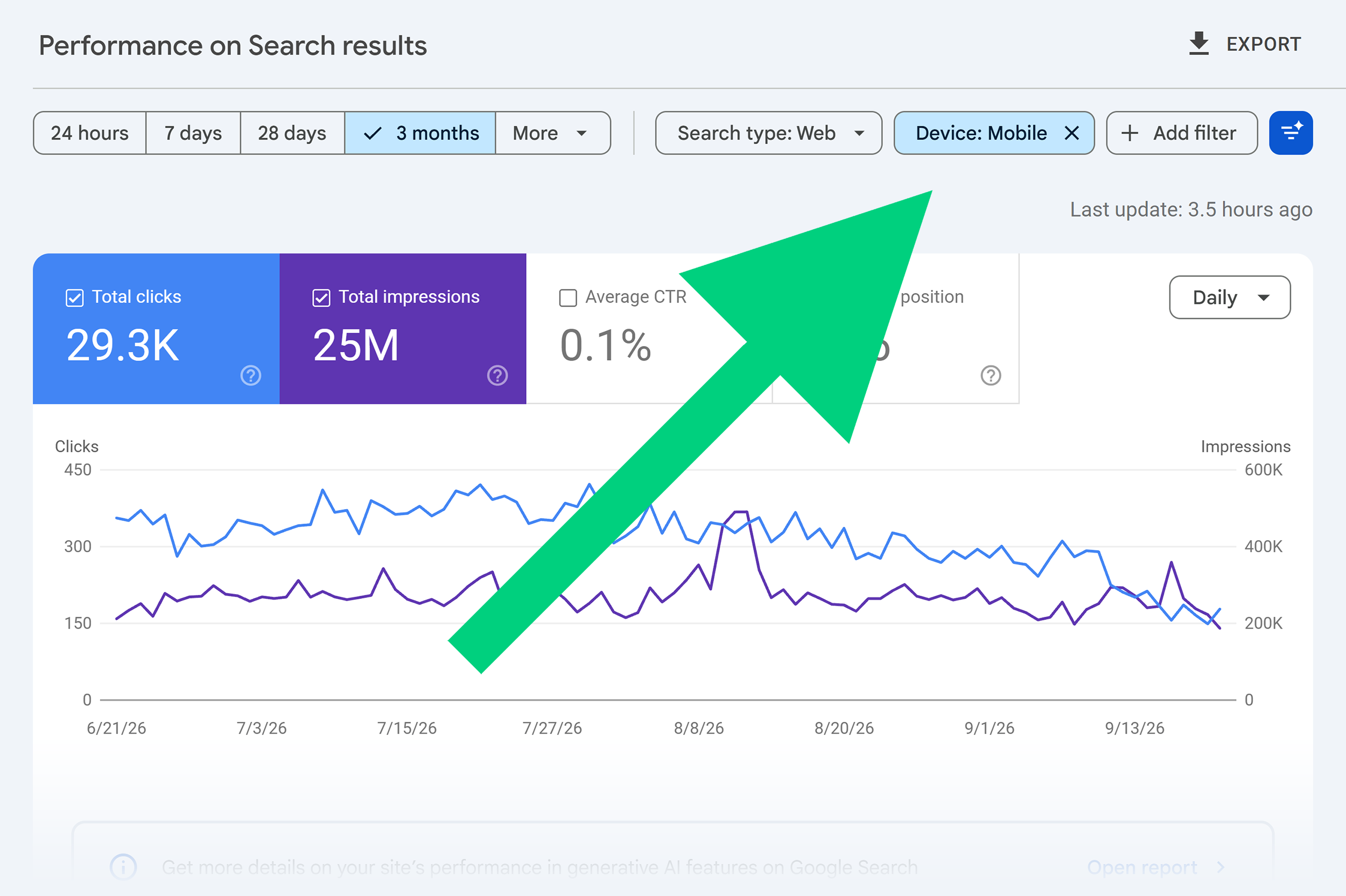
The Search Results report (under Performance) tracks clicks, impressions, average CTR, and average position.

Drill into your content’s performance by type (web, image, video, or news).
And add filters such as “Device” or “Country” to learn more about your audience’s preferences and locations.
My favorite filter is “Query,” which lets you break down results by branded and non-branded searches.
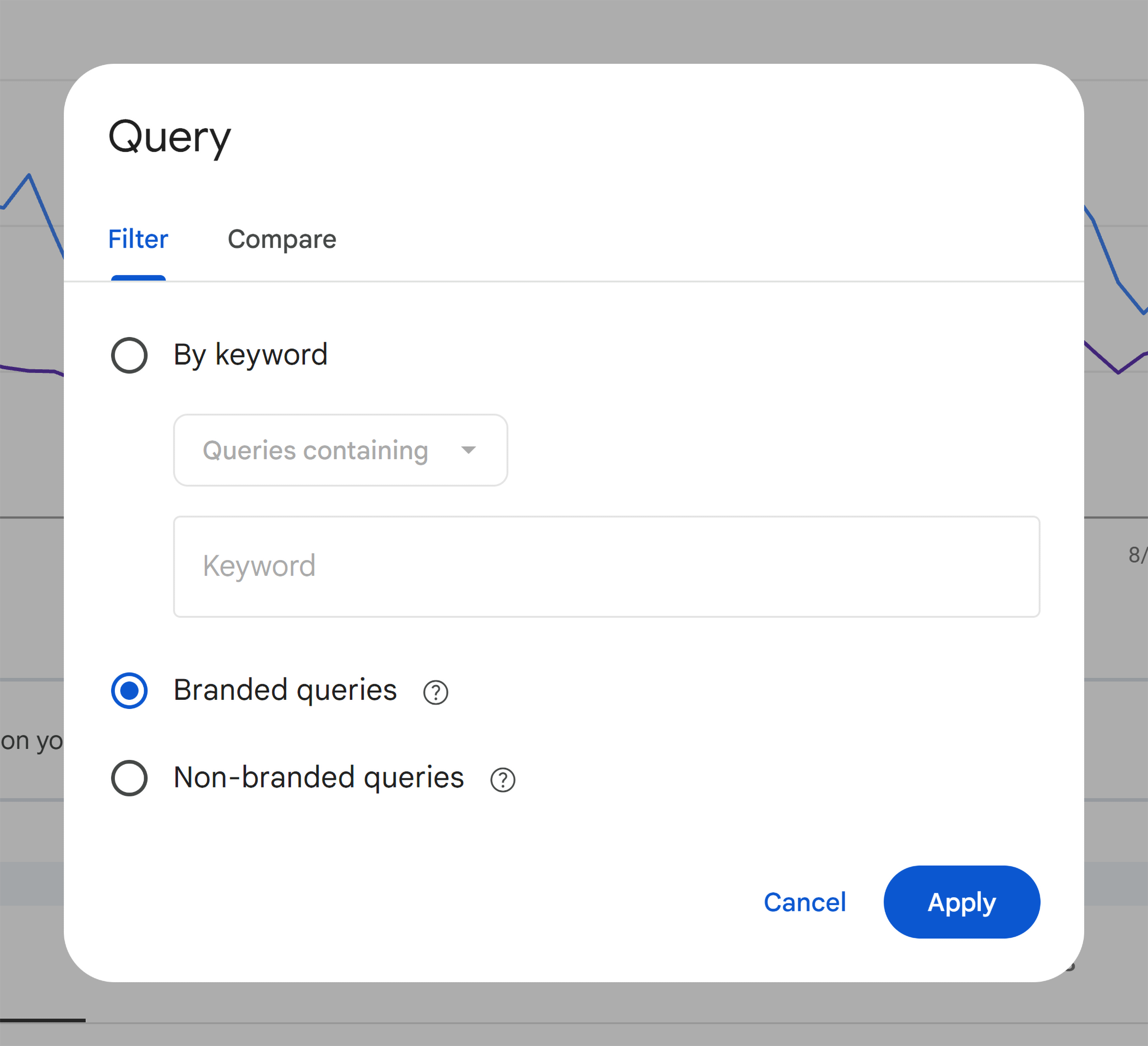
Tracking branded queries can provide an indirect signal that AI visibility is translating into brand awareness.
AI search doesn’t always drive clicks, but it plants your brand in people’s heads, so they search for you directly later.
GSC makes that easy to track.
It also provides a high-level overview of your site’s user experience, including Core Web Vitals metrics like load times, interactivity, and visual stability.

Pros and Cons
| Pros | Cons |
|---|---|
| Free SEO audit tool with basic performance metrics + technical health monitoring | No prioritized list of issues or suggested fixes |
| Branded vs. non-branded filter helps separate brand demand from discovery traffic | No backlink data or AI accessibility checks |
| Indexing, performance, and Core Web Vitals data | Performance data is capped at 1,000 rows per query, which can hide long-tail keyword opportunities |
SEOptimer
Best for budget-friendly, high-level SEO site audits
Price: Free no-login audit; paid plans start at $29/month
When you want a fast rundown of any domain — whether a prospect, competitor, or your own — SEOptimer is a solid, low-cost option.
A subscription includes a dedicated audit tool, along with keyword research, rank tracking, and backlink research tools.
Run a Fast, No-Login Audit on Any Site
SEOptimer lets you run a free SEO audit once per day, and it surprisingly covers a lot of ground.
I ran my small gardening blog through the tool and had a full report in under 30 seconds.
The report scores sites across multiple categories, including on-page SEO, generative engine optimization (GEO), and usability.
The audit report gives your site a letter grade for each category, along with a prioritized list of recommendations.
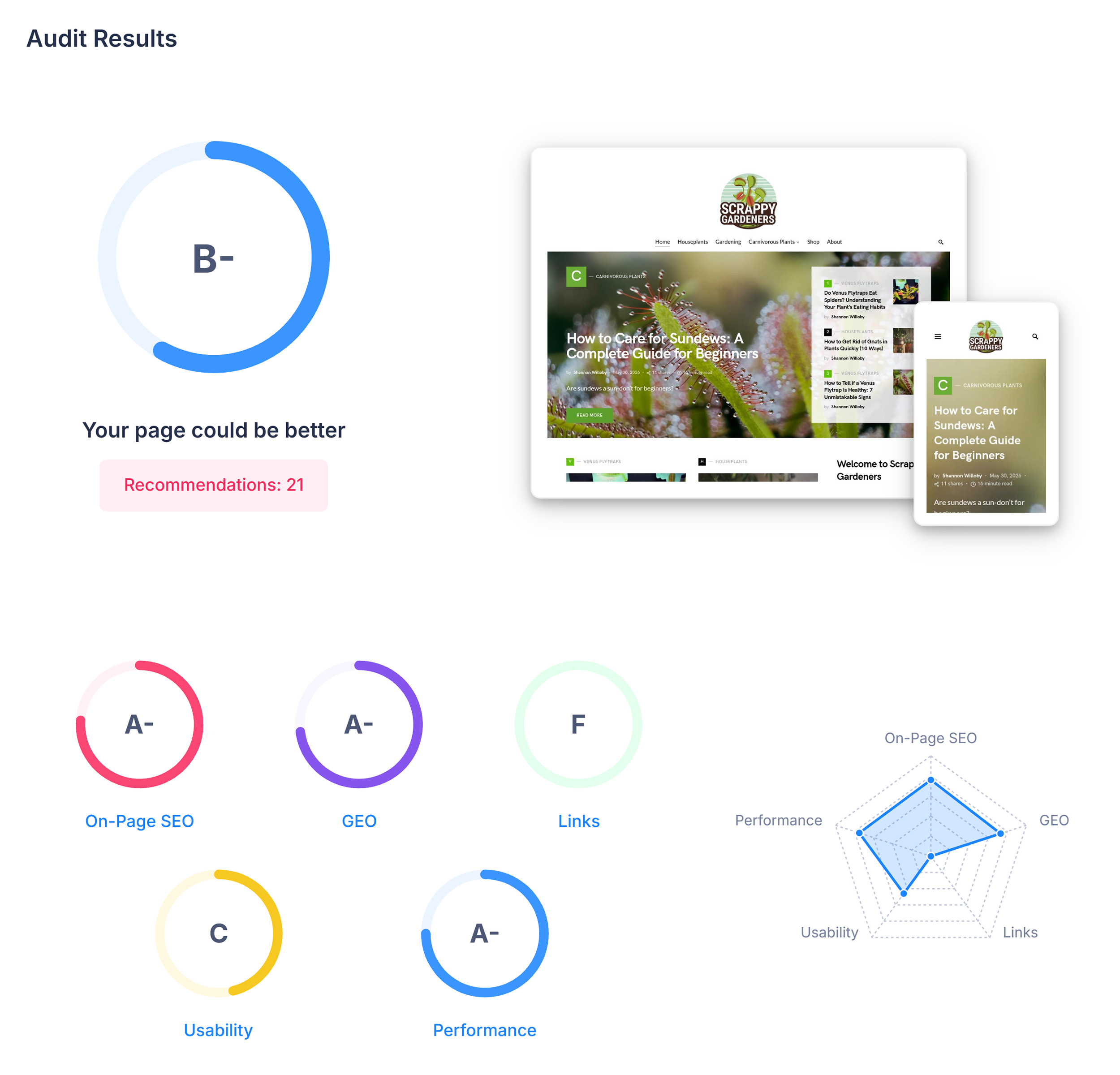
The report surfaced a few things worth noting for my site:
- My mobile page load speeds need immediate attention, but desktop performance is solid
- I need to work on adding more internal links (and more content overall)
- There’s a rendering issue that could be hurting my LLM visibility
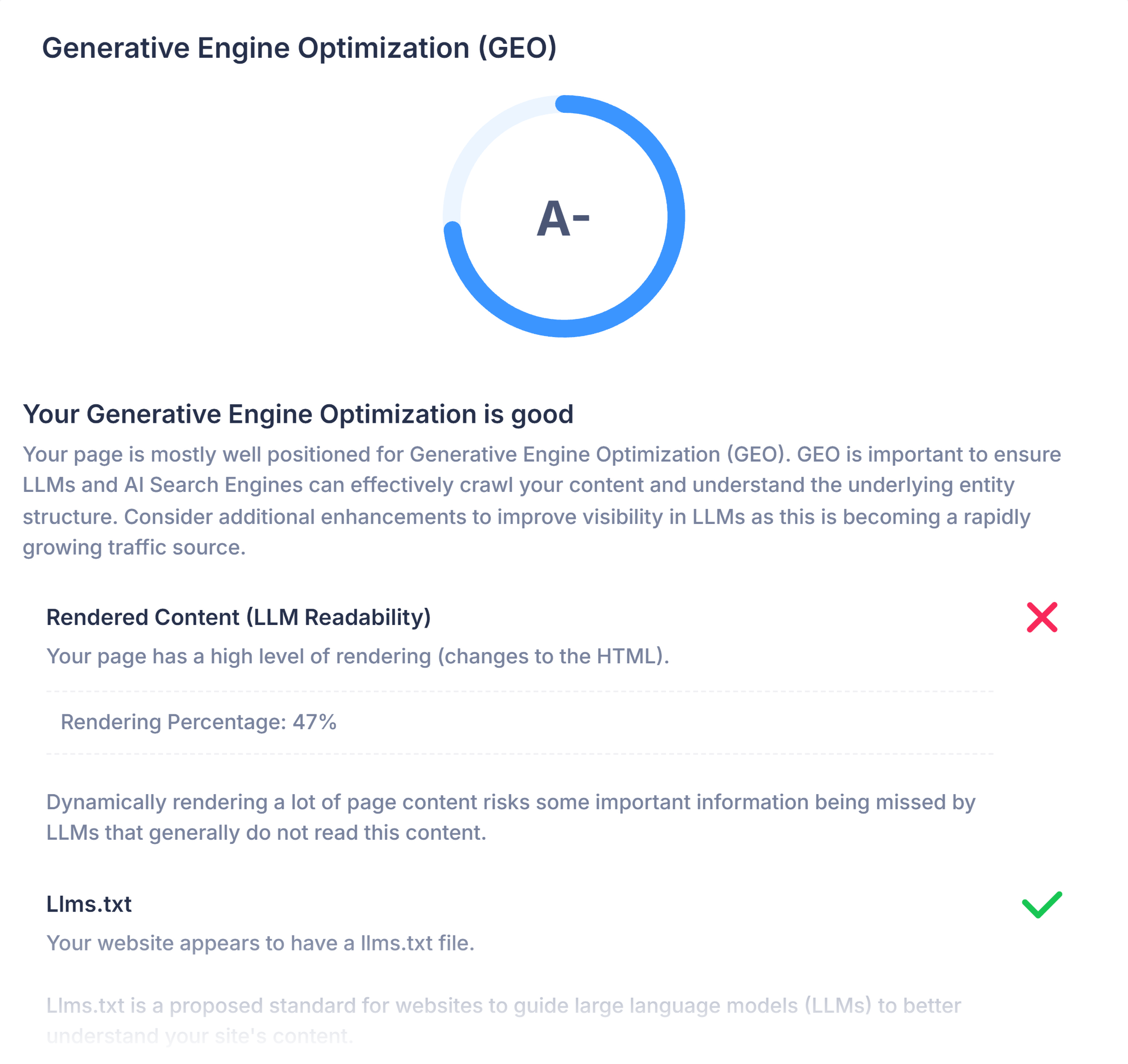
For a quick, high-level look across many categories, this tool delivers.
But it doesn’t provide in-depth information. You’ll see what’s wrong, but not much detail on why or how to fix it.
A paid subscription adds keyword rankings, local SEO insights, and the ability to save and schedule audits over time.
If you’re an SEO consultant or small agency owner, a notable standout is SEOptimer’s embeddable audit widget.
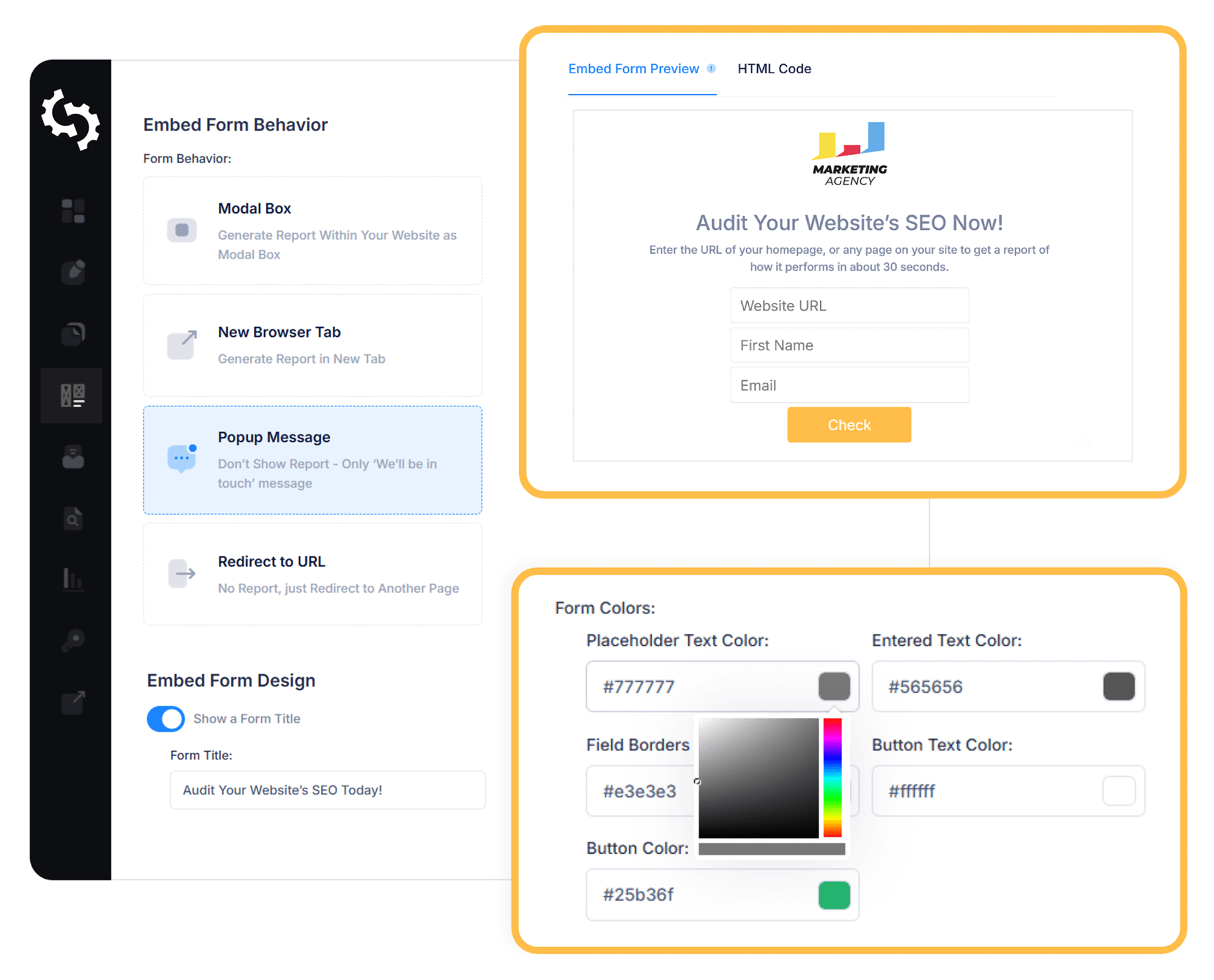
It lets your web visitors enter their URL and email address to receive an instant SEO audit report, customized with your brand’s colors and logo.
The audit results then go straight to your inbox as a lead.
Pros and Cons
| Pros | Cons |
|---|---|
| Free, basic, no-login audit runs over 100 checks in under 30 seconds | Free audit report doesn’t let you save, schedule, or track audits over time |
| White-labeling available on certain plans | DIY plan is light on features compared to other all-in-one SEO platforms |
| Embeddable audit widget doubles as a lead-gen tool for SEO freelancers and agencies | AI Search and GEO features are mostly behind premium plans, with only basic checks in the free version |
All-in-One SEO Audit Platforms
These audit tools aren’t built to just find problems — they help you fix them, too.
Semrush’s Site Audit
Best for comprehensive technical + AI search auditing
Price: Free plan available; paid plans start at $139.95/month

Site Audit provides in-depth technical auditing and AI accessibility in one user-friendly dashboard.
Every Semrush One plan includes Site Audit along with a full suite of SEO tools — from competitor analysis to AI visibility tracking — so you can do the majority of your SEO work without switching tabs.
Automatically Monitor Any Site’s Technical Health and AI Accessibility
Semrush’s Site Audit checks for 140+ technical and on-page SEO issues, sorts them by severity, and provides plain-language guidance on how to fix each one.
This includes crawlability, Core Web Vitals, internal linking, structured data, HTTPS, and much more.

Then, it alerts you by email about its findings.
For example, I use Site Audit to monitor my gardening blog, and it recently alerted me to a new error: an incorrect page in my sitemap:
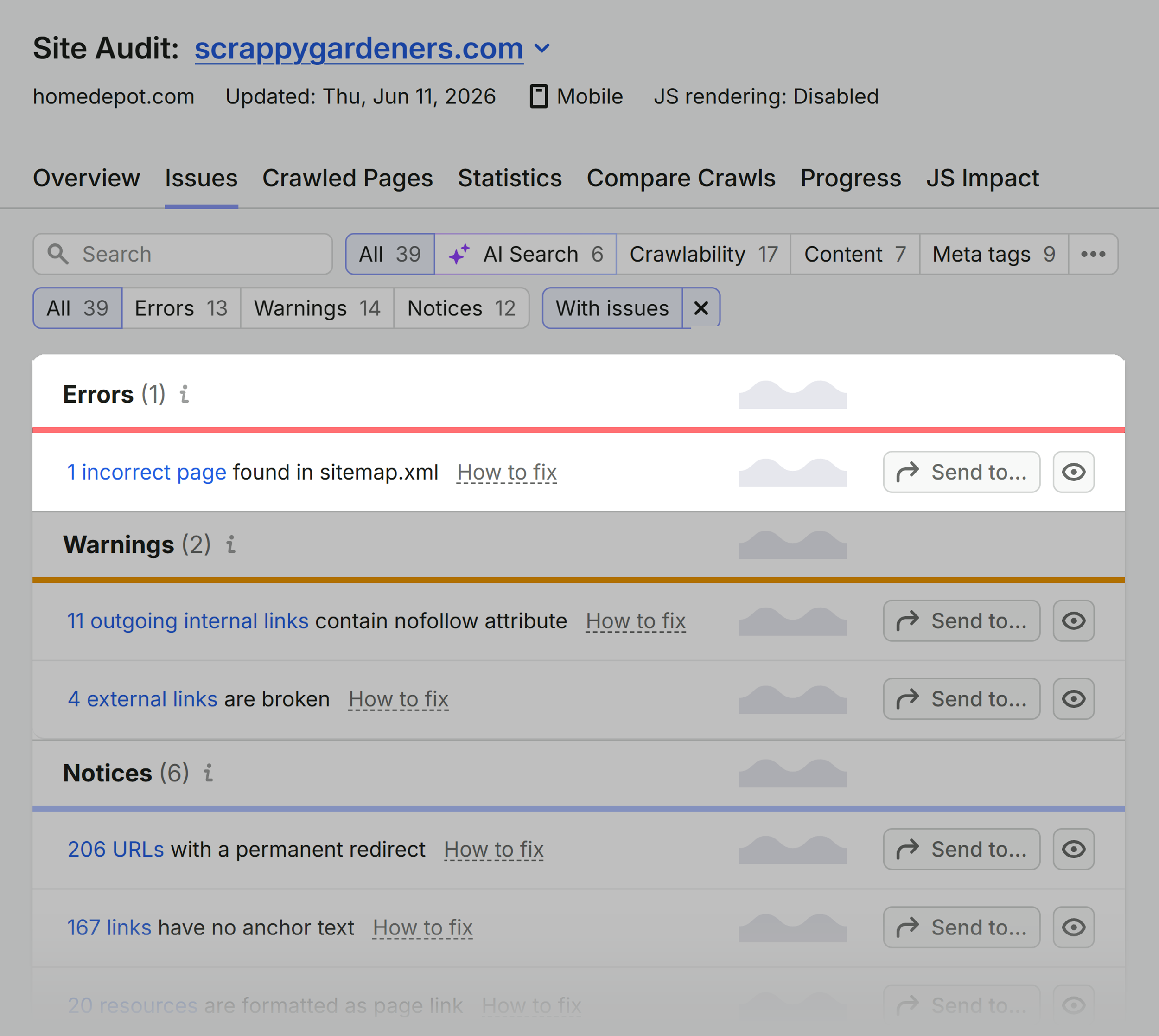
A little digging revealed a conflict between Rank Math and a redirection plugin I’d just installed — an easy fix I never would have caught without the tool.
Regular monitoring matters even more at scale.
Chris Shirlow, owner of FourHorse Digital, a digital marketing agency, runs Site Audit across his entire client roster:

Site Audit is my always-on monitoring across all clients. The weekly reports are my safety net, catching stuff before I do if something breaks.
On bigger sites and ecomm builds, that’s broken pages, slow pages, random duplicates — issues you can’t QA manually at scale.
For local SEO work, where I’m publishing dozens of location and service-area pages per client, it’s the broken internal links, redirect chains, and orphan pages that can quietly cost rankings if you’re not watching.
But my favorite feature is the AI accessibility integration.

The AI Search Health Report flags issues like:
- Blocked AI bots
- Low text-to-HTML ratio
- Content that isn’t optimized for AI
- Duplicate content in H1 and title tags
- Missing llms.txt files
The higher your score, the better your site’s technical readiness for AI systems.
Chris Shirlow uses this report as a starting checkpoint with new clients:
Site Audit’s AI Search Health report is a solid diagnostic — I’ve inherited sites where AI crawlers were blocked in robots.txt, which is easy to miss if you’re not looking for it.
The AI Health score is also a clean metric clients can grasp. It’s not a replacement for deeper AI visibility analysis, but it confirms the foundation is in place before the real work starts.
For even larger organizations, there’s the Site Intelligence tool, which is part of the Semrush Enterprise plan.
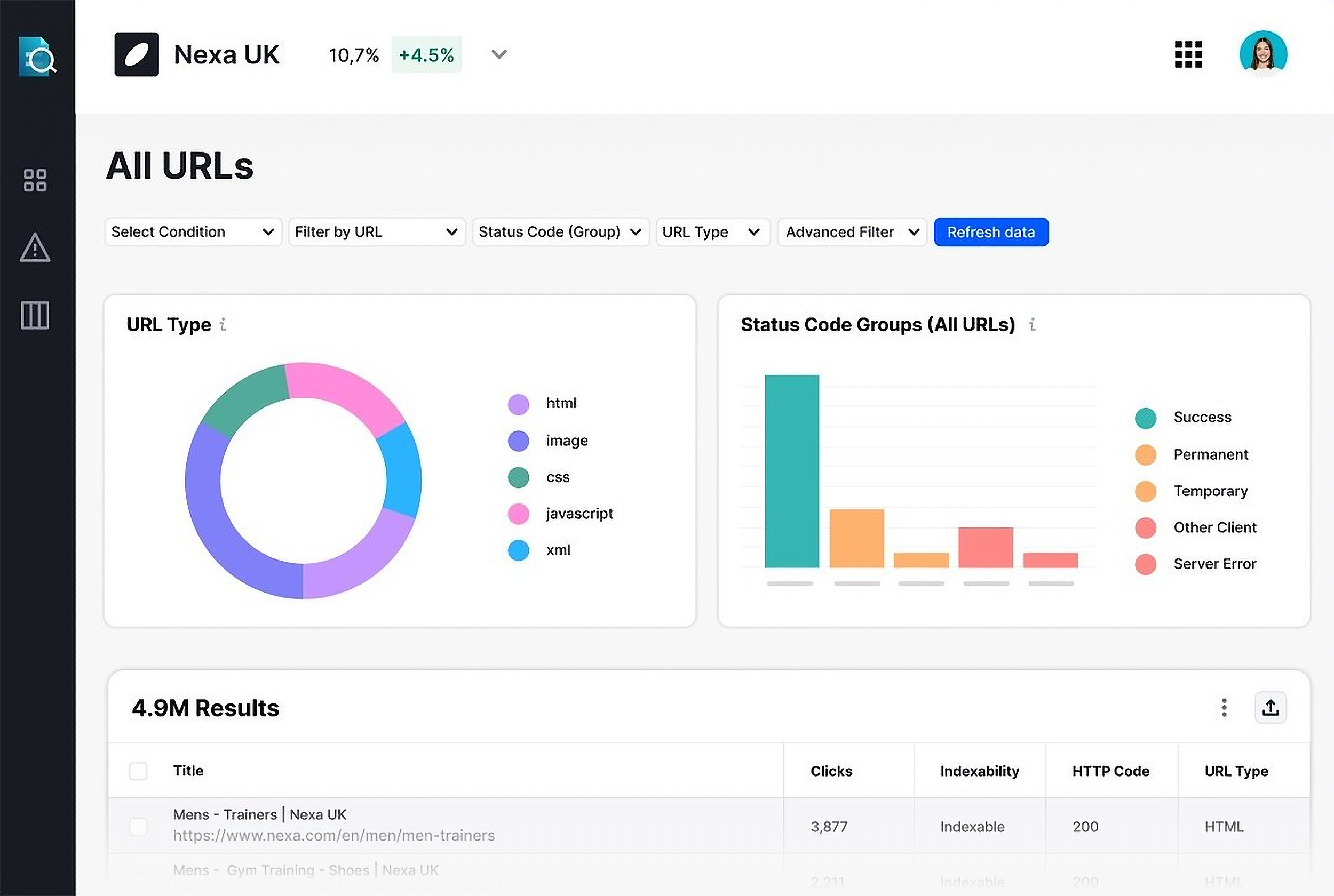
Designed for enterprises, it monitors technical SEO and AI search accessibility across millions of pages and includes QA and compliance checks.
Pros and Cons
| Pros | Cons |
|---|---|
| Crawl up to 1 million pages per month, depending on your plan (1 million+ with Semrush Enterprise) | Each plan includes one user seat — extra seats cost $45–$100/month |
| Customizable alerts and audit reports; white labeling available | Paid subscriptions come with multiple SEO tools, which may be more than some users need |
| All-in-one platform with tools for keyword research, backlink analysis, competitive research, and AI visibility tracking |
SE Ranking’s Website Audit
Best for tracking SEO audit progress across multiple sites or clients
Price: Starts at $129/month
SE Ranking is an all-in-one SEO platform that bundles site auditing alongside keyword research, rank tracking, and backlink tools.
Run and Compare SEO Audits Across Multiple Client Sites
Whether you run audits across 3 or 30 sites, things can get messy fast.
SE Ranking lets you group audits by category, such as “Local Businesses,” “Ecommerce Clients,” or “Internal Brands,” so they stay organized in one dashboard.

Each audit tracks 115+ issues across crawlability, security, website performance, and on-page factors.
You’ll also get a site SEO score, Core Web Vitals overview, and a list of issues tagged by severity.

Every issue comes with a “How to fix” explanation, so anyone on your team can act on the findings — not just the SEO lead.

Compare any two audits side by side to see exactly how a site’s Health Score, errors, warnings, and notices have changed between scans.
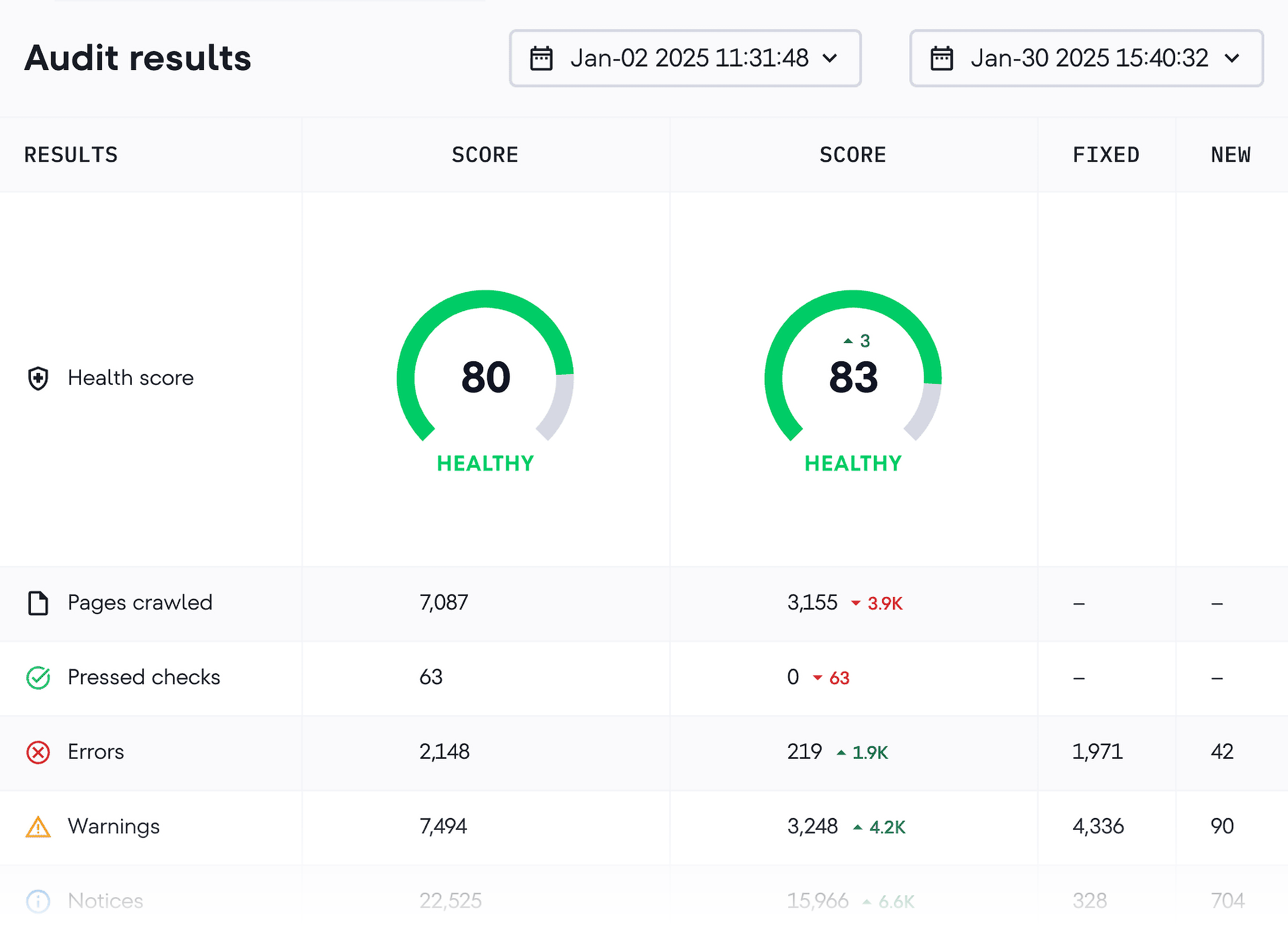
Each comparison shows what’s been fixed and what’s new, which makes it easy to quantify the impact of your SEO work for stakeholders or clients.
Pros and Cons
| Pros | Cons |
|---|---|
| Audit up to 2 million pages per month, depending on your plan | 250K page audit limit on the most affordable plan ($129); 2M page limit costs $279/mo |
| Group multiple audits into categories to keep client work organized | White-label branding requires the Agency Pack add-on ($69/month) |
| Includes SEO tools and limited AI search visibility tracking on all plans | Full AI search tracking requires an $89 add-on |
Conductor Monitoring
Best for real-time monitoring of large, high-stakes sites
Price: Custom pricing
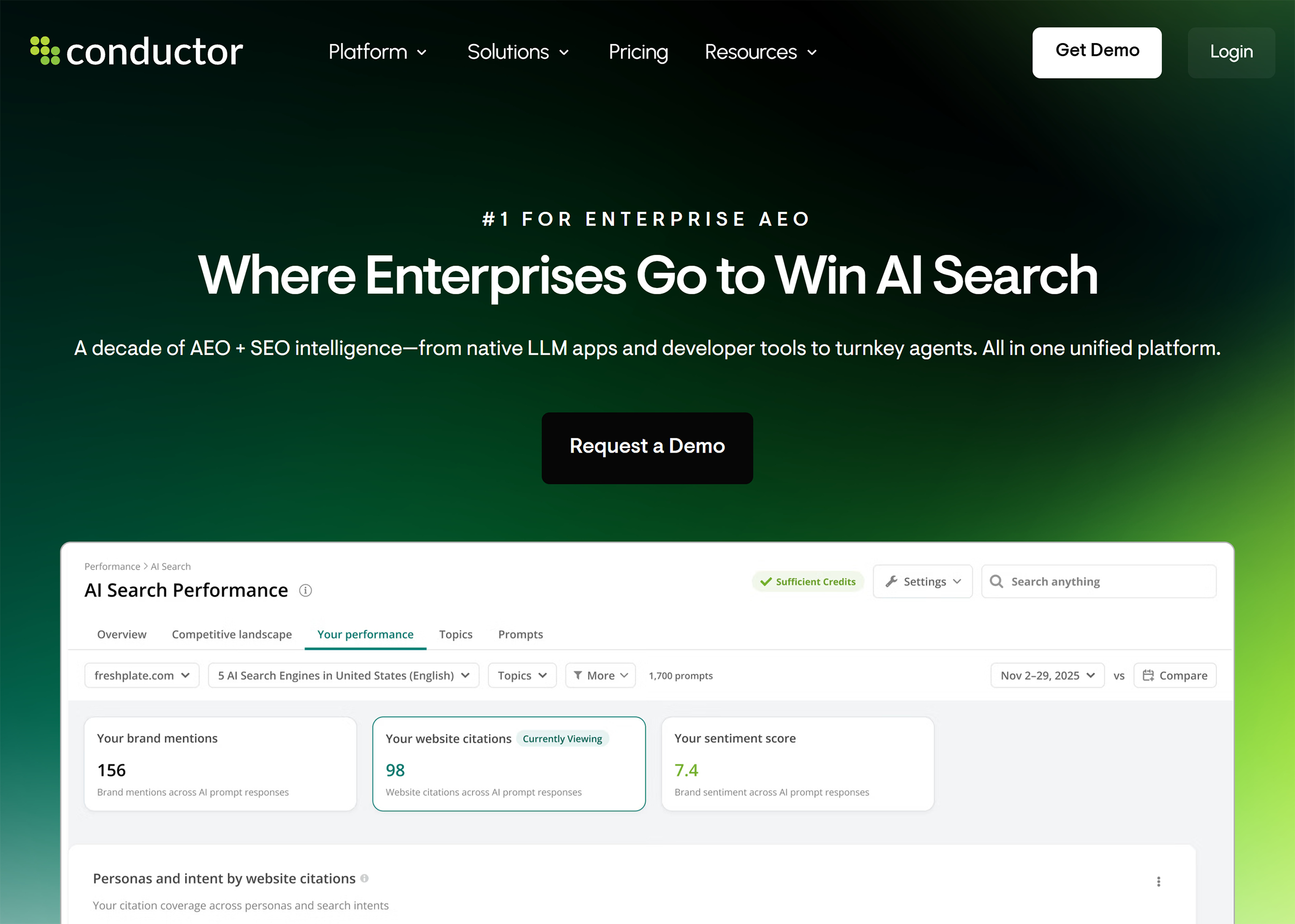
Conductor Monitoring is designed for high-traffic sites where even a small issue can cost real revenue.
It monitors your site continuously and sends alerts the moment something changes.
Catch Site Issues the Moment They Happen
Conductor Monitoring runs continuously, so issues surface as they occur rather than when the next crawl is due.

It also learns which pages on your site drive the most traffic and revenue and monitors those more frequently.
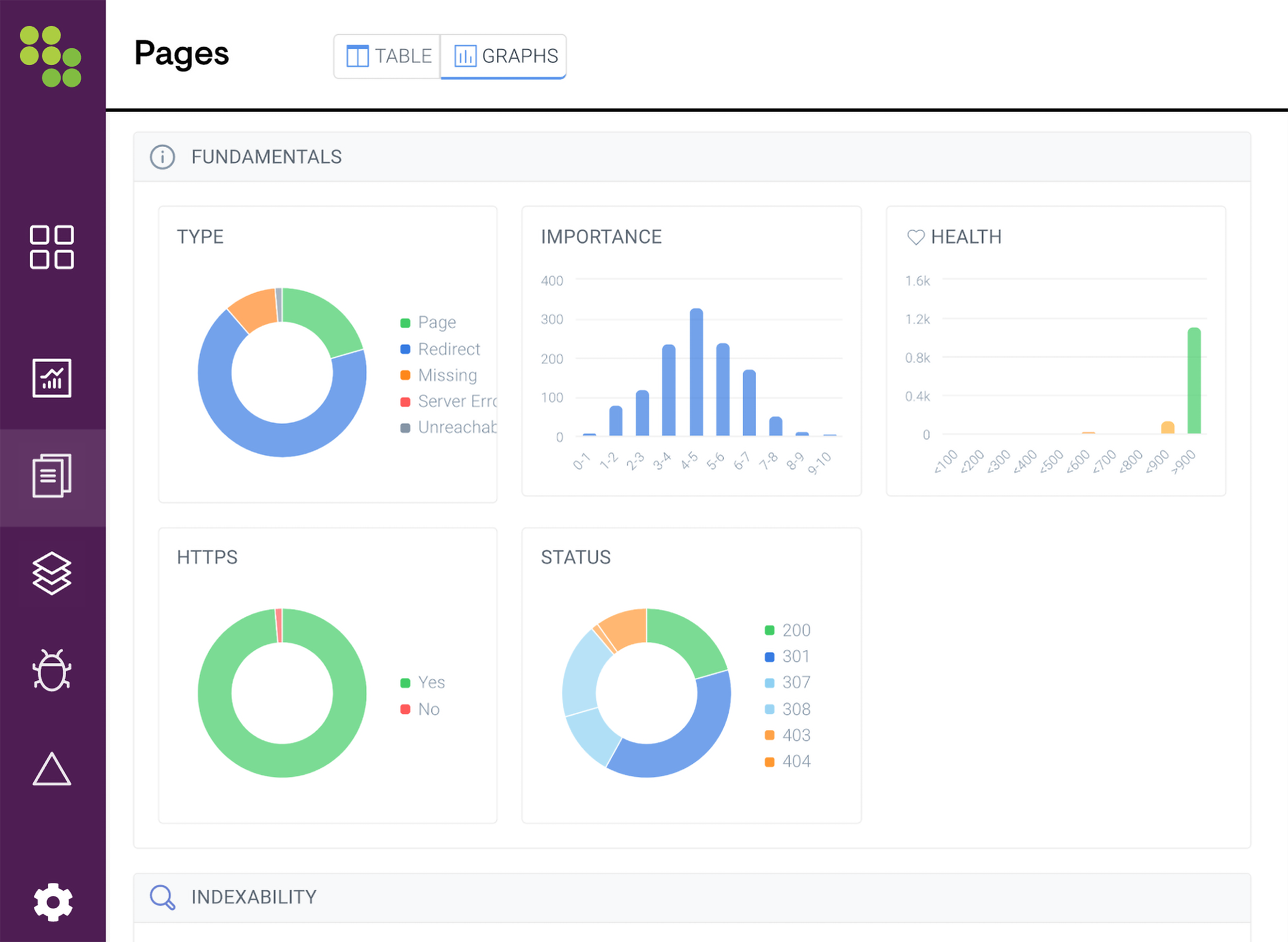
So if a critical product page or top-performing blog post breaks, you’ll know before the rest of the site is checked.

Conductor also tracks AI crawler activity, helping you see which pages AI systems access, how frequently they’re crawled, and whether there are barriers to AI discoverability.
Alerts are also highly customizable.
Adjust the scope, triggers, sensitivity level, and recipient for each alert, so the right person sees the right problem on the right page, instead of getting pinged about every notice on every page.

Another cool feature for big teams is Conductor’s Content Change Tracking log.
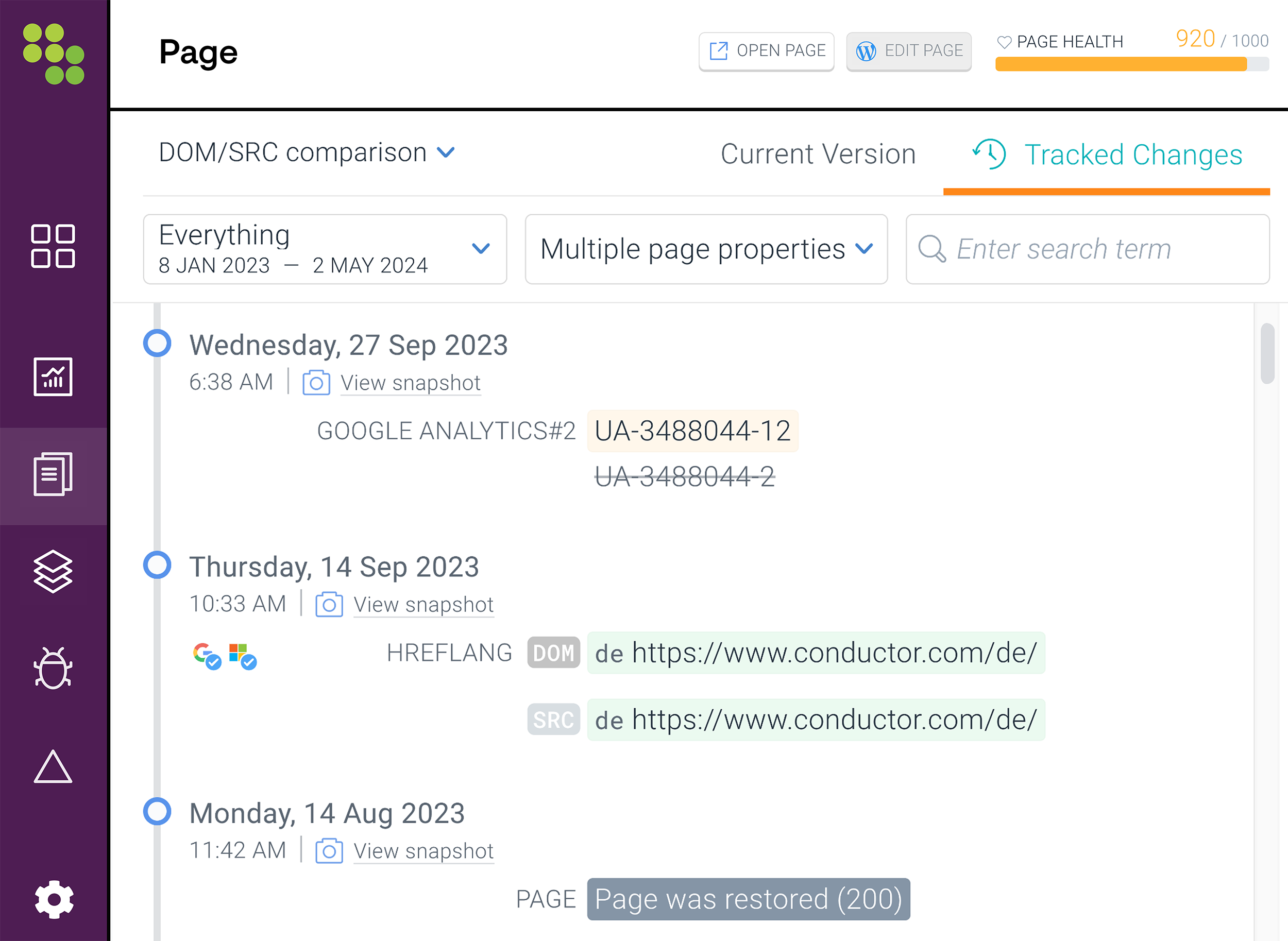
It records what changed, where, and when, with timestamps and before-and-after values that make the cause of a performance shift easier to investigate.
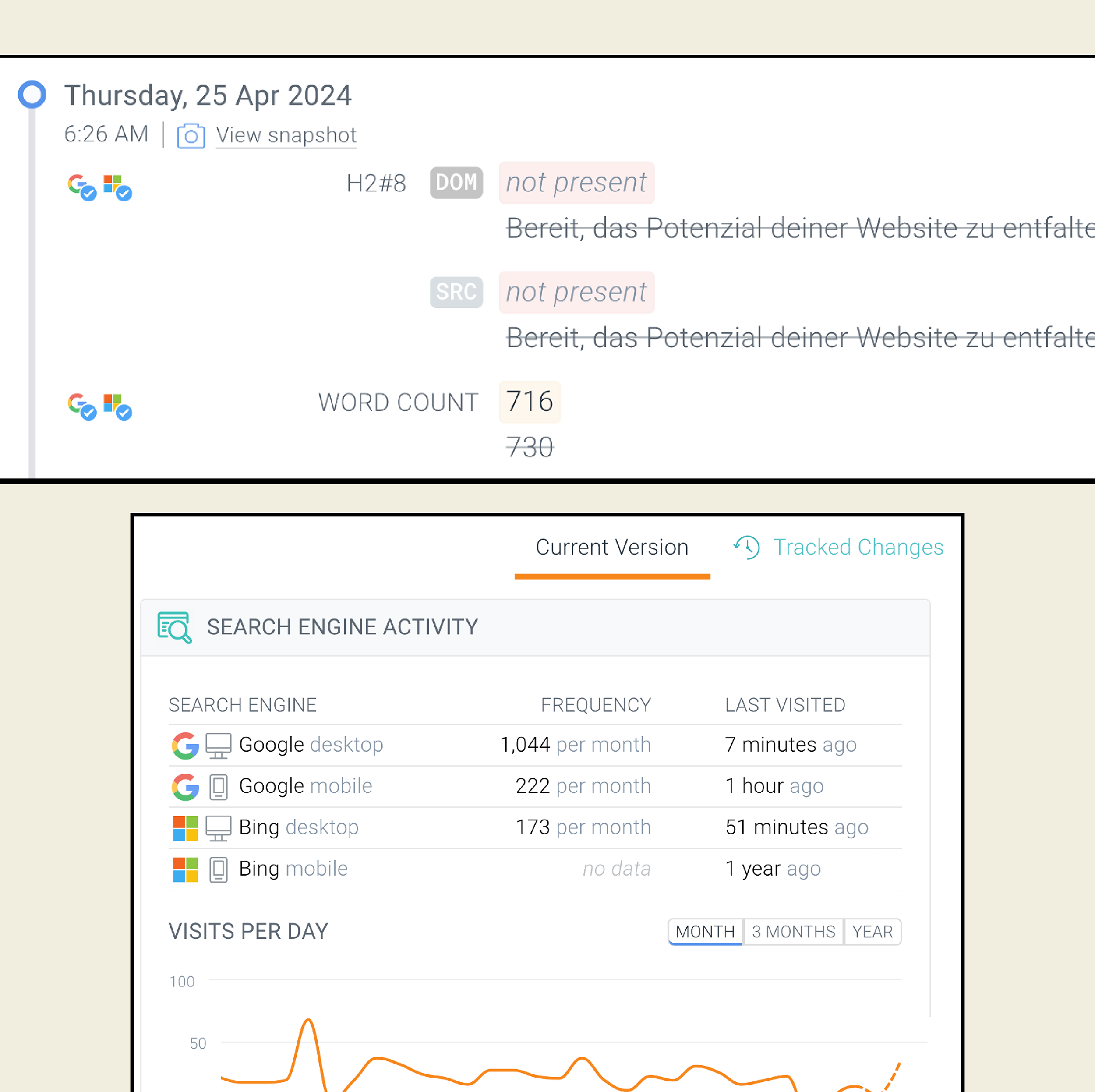
For teams with multiple stakeholders editing the site, that changelog will save a lot of time.
No more tracking down the details or trying to understand when a change was made that affected your site.
Pros and Cons
| Pros | Cons |
|---|---|
| Continuous 24/7 monitoring (or whatever frequency is desired) | Conductor isn’t transparent about its pricing, but users report a steep price point |
| Customizable alerts to focus on the pages that drive the most traffic and revenue | Overkill for teams without dedicated SEO support to manage setup |
| Tracks AI bot crawling alongside SEO monitoring |
Specialized SEO Audit Tools
These auditing tools focus on specific parts of SEO: technical crawls, local search, and content optimization.
They’re worth adding to your stack when a more general tool doesn’t tell the full story.
Screaming Frog
Best for customizable technical crawl analysis
Price: Free up to 500 URLs; $279/year per license after that

Screaming Frog is a technical SEO audit tool that assesses your site for 300+ technical and on-page issues.
There’s no SEO health score or user-friendly dashboards, but that’s sort of the point.
This tool is designed for SEOs who already know how to interpret raw data and want more advanced crawl customization.
Run Configurable, In-Depth Crawls on Sites of Any Size
Screaming Frog is a desktop app (Windows, macOS, Linux) that requires a quick download to use.

It alerts you to a wide range of technical issues, including:
- Robots.txt
- 4xx errors
- Canonical tags
- Redirect audits
- Hreflang issues on multi-region sites
- Missing or duplicated metadata (titles, meta descriptions)
- Broken internal links
- Content readability analysis
To test it out, I ran a quick audit on my gardening blog.
The report was organized by type (errors, warnings, opportunities) and estimated priority (high, medium, low), which made it easy to prioritize next steps.
It flagged a few different things worth fixing, including two URL pagination errors and 31 URLs with images over 100KB.
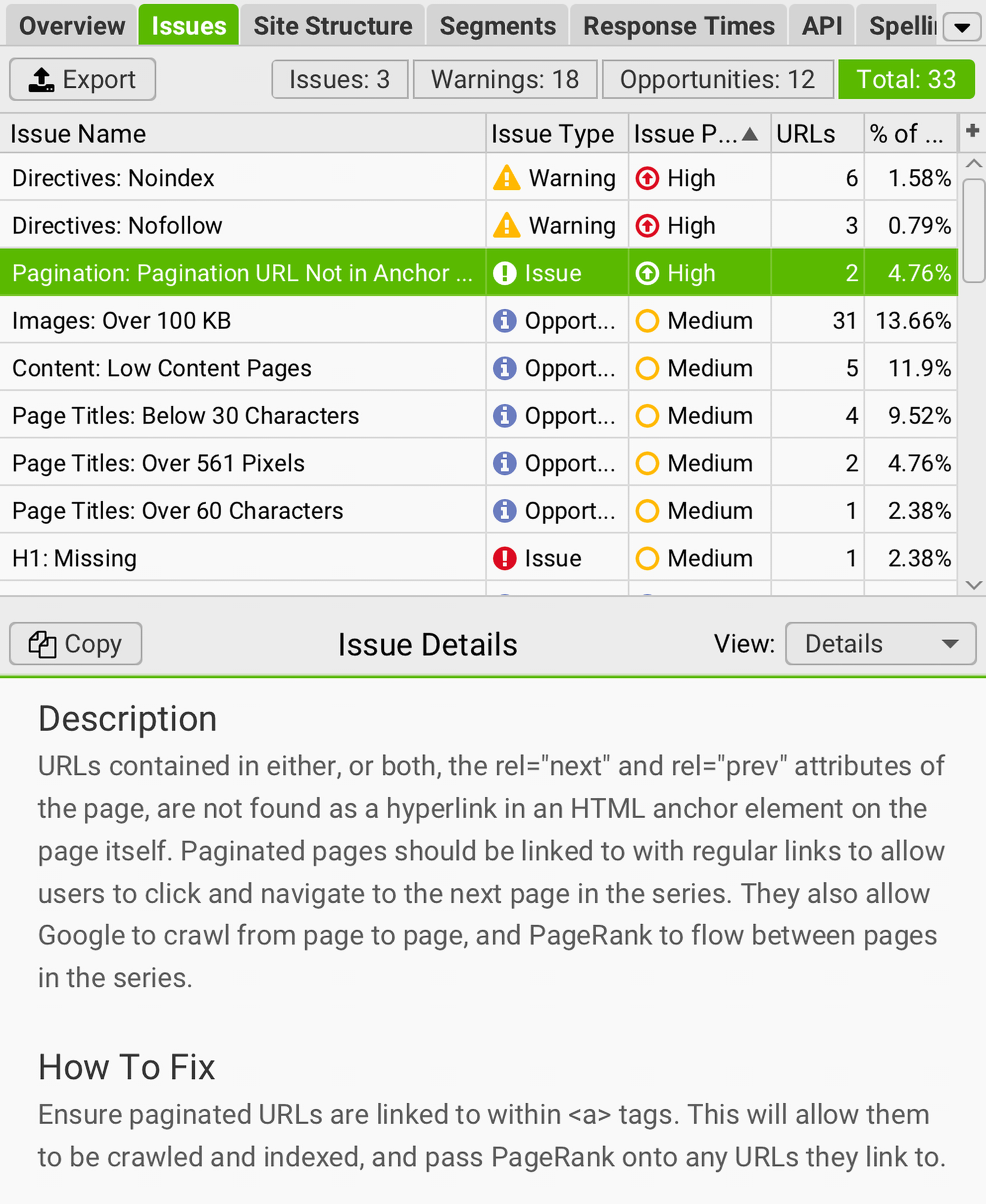
While it was good info, the download alone was overkill for a small site like mine.
But large sites are a different story.
On a paid plan, you can audit any number of pages, whether thousands or millions.
But the configuration menu is where Screaming Frog really stands out from other auditing tools.

It lets you:
- Choose which page elements to extract (page titles, headings, structured data, images, HTML) and skip to keep crawls fast
- Switch between user agents to see your site the way Googlebot, Bingbot, or any custom crawler would
- Set custom HTTP headers to test how your site responds to different request setups
- Render JavaScript to see your site the way search engines do
- Decide which post-crawl checks run automatically based on what you’re auditing
Chris Shirlow uses Screaming Frog for the technical work that goes beyond what cloud-based monitoring can handle:
I use Semrush’s Site Audit for my baseline monitoring across all clients, but Screaming Frog is what I reach for when I need to really dig into a site at the URL level.
I recently ran a 2,600+ URL content audit, and SF gave me the granular per-URL data I needed to make decisions at scale. I’m currently using it for an internal link audit too, pairing the exports with Python for deep custom analysis.
Pros and Cons
| Pros | Cons |
|---|---|
| Generous free tier (500 URLs with no time limit); unlimited crawls on paid plan | Much steeper learning curve than cloud-based tools; no user-friendly dashboards or insights |
| Configurable crawls let you target specific subfolders, switch user agents, and extract custom data | Desktop-only; may slow down your computer and eat up memory |
| One-time annual fee instead of a monthly subscription | Doesn’t include additional SEO or AI search tools |
BrightLocal
Best for local SEO auditing and tracking rankings block by block
Price: Starts at $40/month for one location.
BrightLocal is a local SEO audit tool that audits your entire local presence, from your Google Business Profile (GBP) to third-party listings.
It’s popular with local SEO agencies (and local business owners) for its in-depth insights and user-friendly reports.
Audit Local Search Visibility and Track Rankings Block by Block
Whether you’re after more website traffic, foot traffic, or both, BrightLocal can help you get there.
The audit is broken into categories, with in-depth reports for on-site SEO, reviews, listings, GBP, rankings, and more.
The report is color-coded by health status — Good, OK, or Poor — so you can see at a glance where to focus.
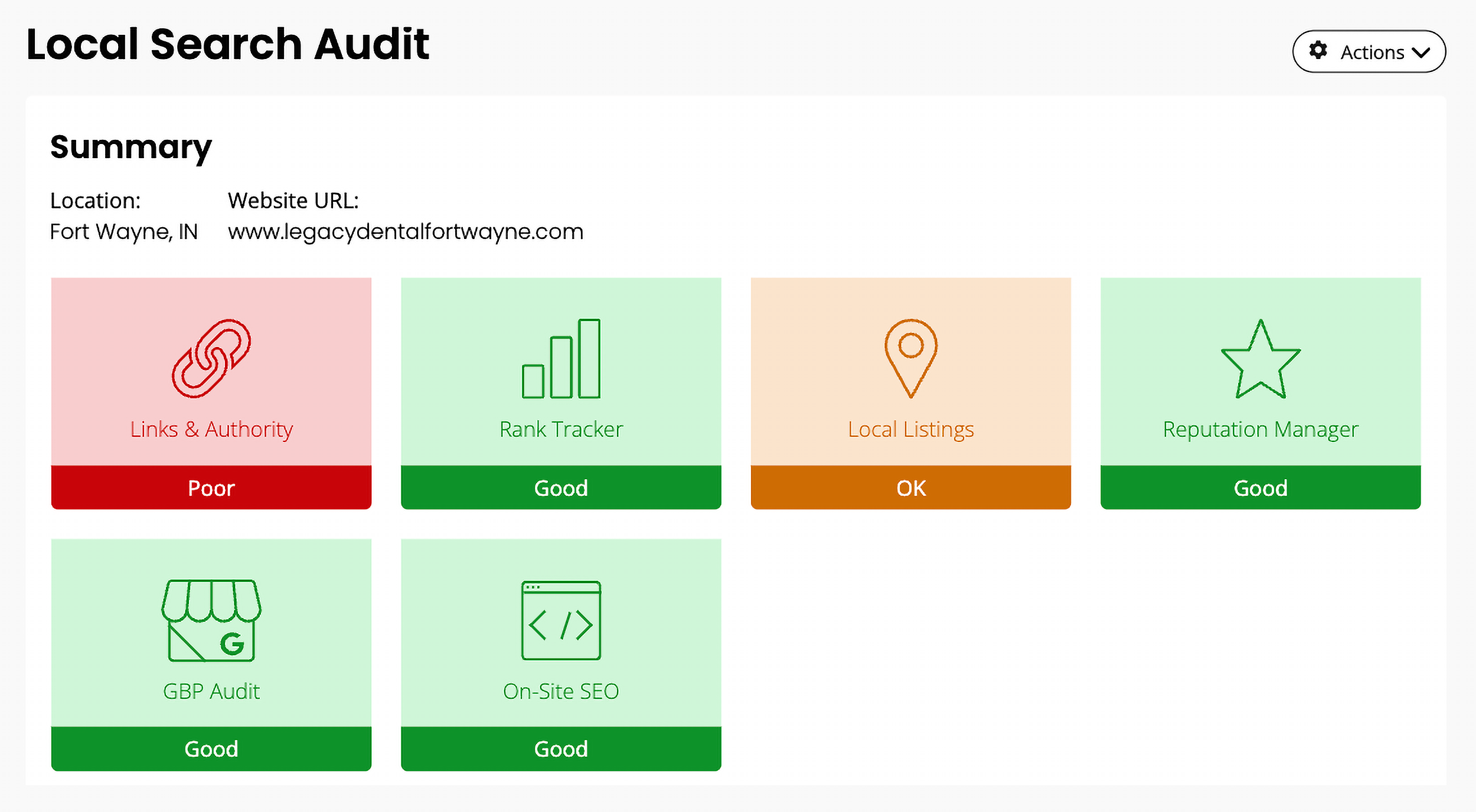
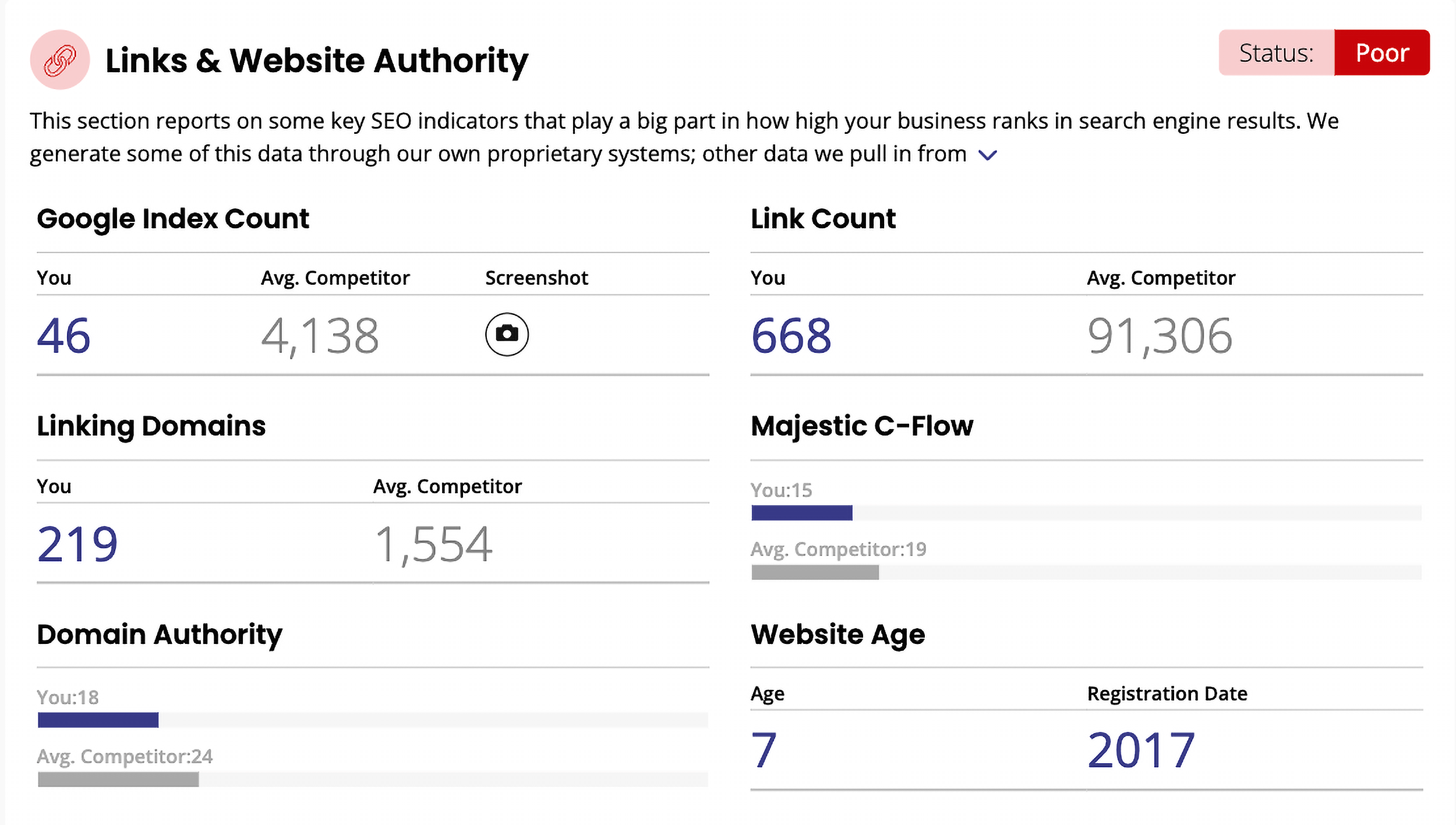
It also benchmarks you against competitors.
The Links & Website Authority section compares your link count, linking domains, and website authority so you know where you stack up.
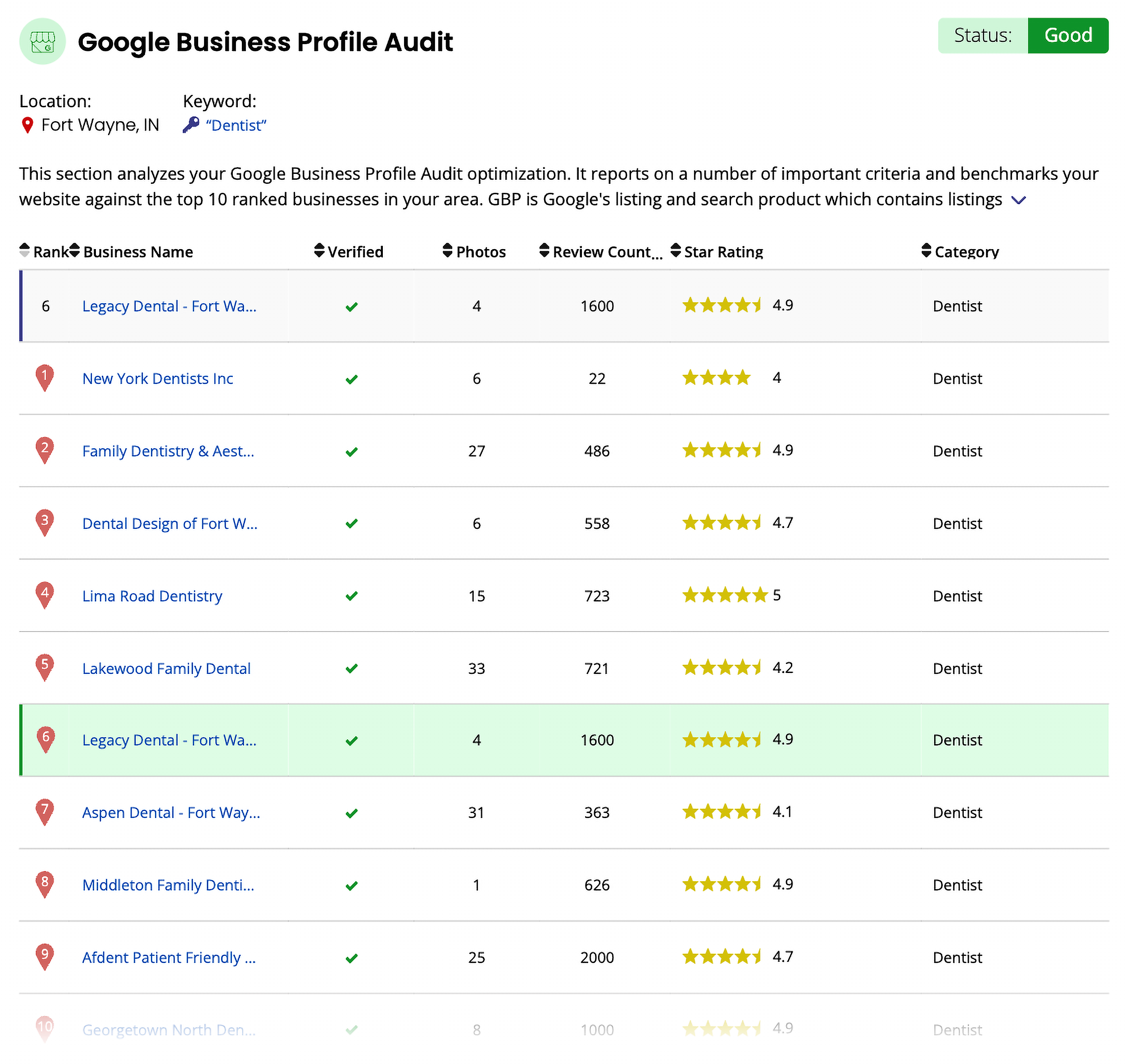
The GBP Audit benchmarks your profile against the top 10 businesses ranking for your target keywords, which is valuable data you’d have to piece together manually otherwise.
You’ll learn how many photos they post, total reviews, star ratings, and rankings, so you can beef up your profile and outrank them.
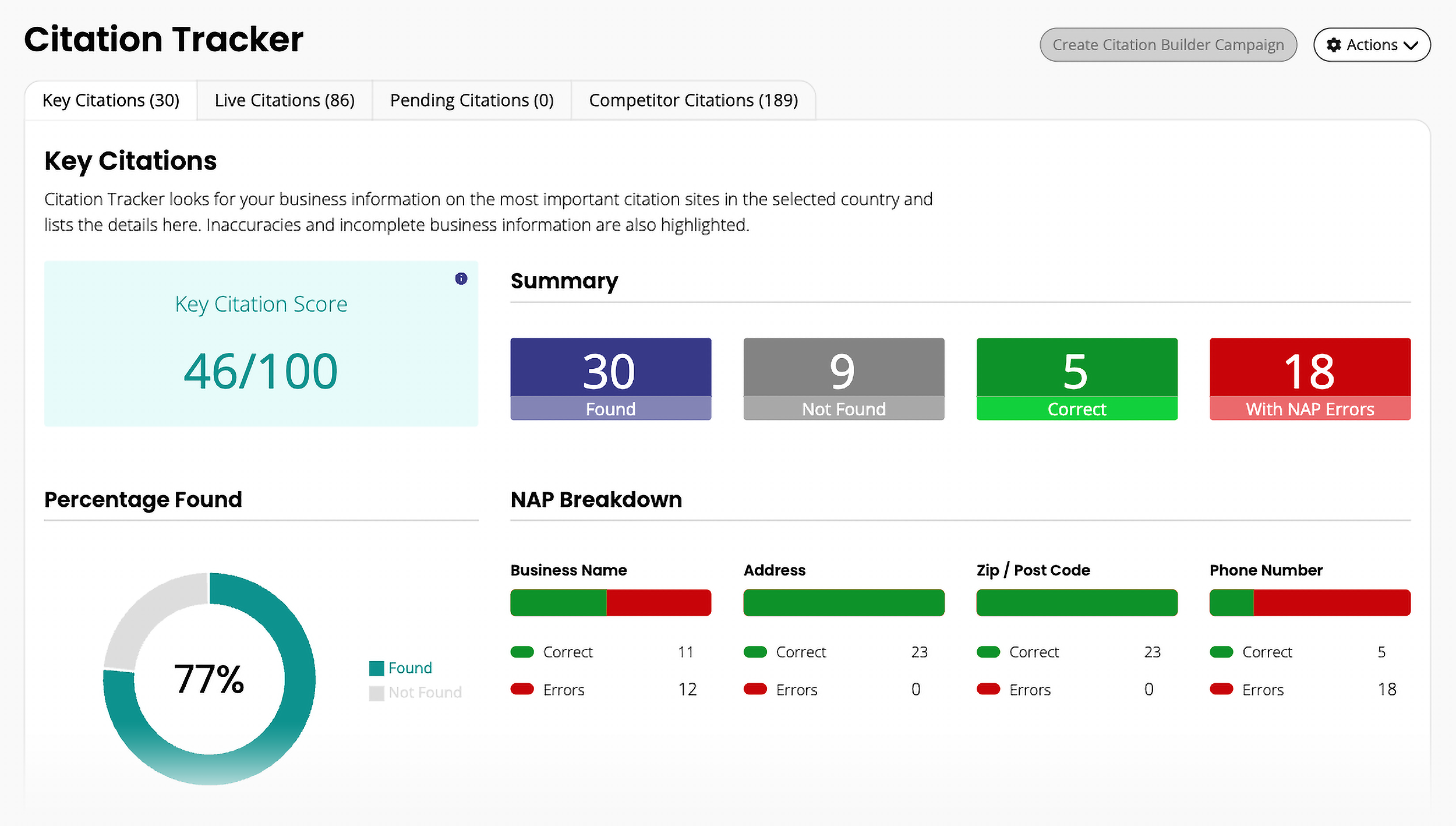
The report audits your GBP from every angle, so you know exactly what you need to improve, including:
- NAP (name, address, phone) inconsistencies across directories
- Missing or incomplete GBP attributes — hours, services, attributes, photos
- Schema markup gaps specific to local business listings
- Review velocity and rating compared to competitors
- Citation gaps where your business isn’t listed but should be
Then there’s the Local Search Grid, which I think is BrightLocal’s most interesting feature.
It tracks up to five keywords across a geographic grid around your business and returns rankings for you at each point.
(And your top 10 competitors.)
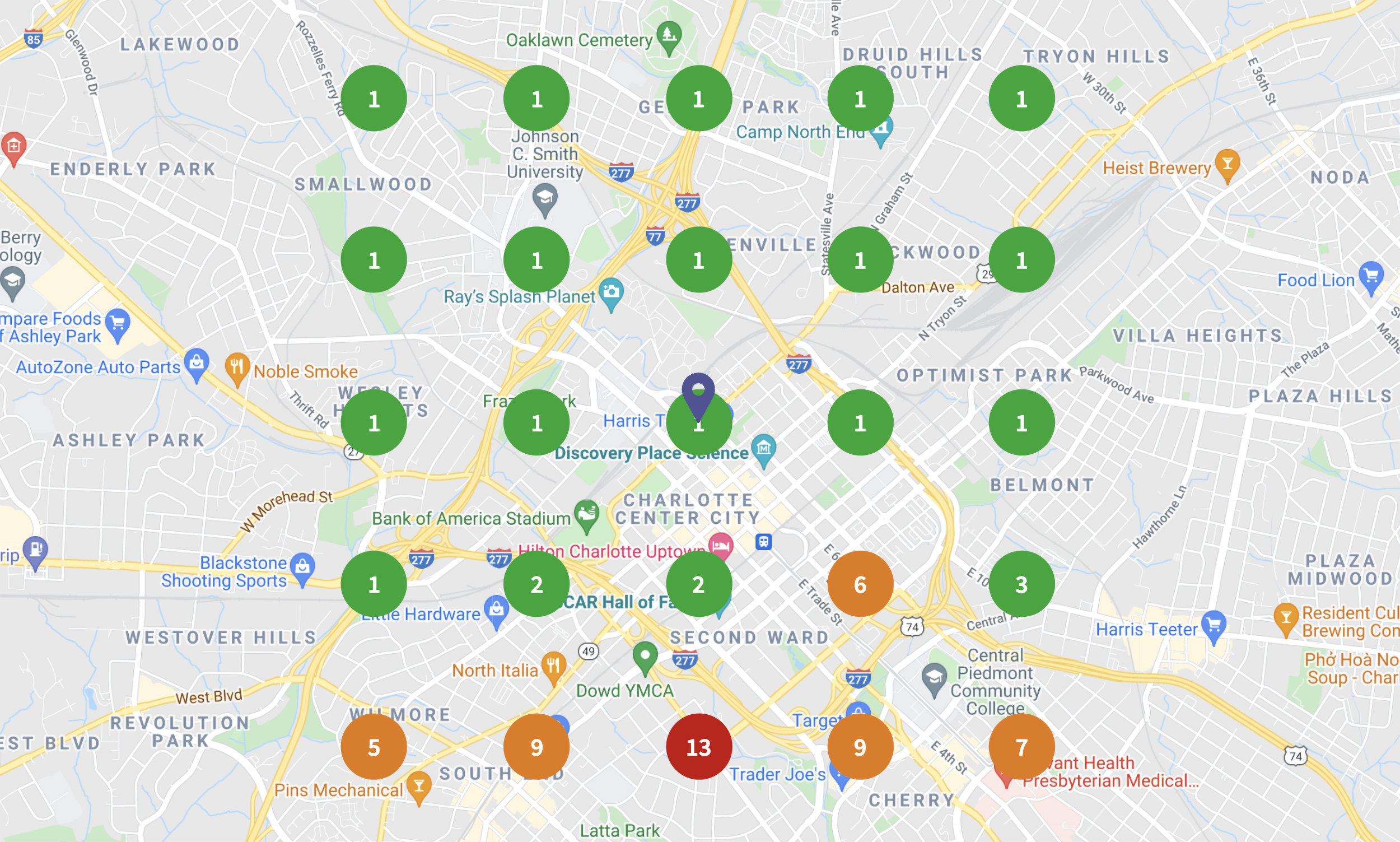
That matters because local rankings change block by block — you might rank #2 near your front door and drop off a few streets over.
The grid also tracks these changes over time, so you can see if your visibility is expanding or shrinking week to week.
For agencies managing multiple client locations, it’s a clean way to show clients exactly where their GBP wins and loses across their service area.
Pros and Cons
| Pros | Cons |
|---|---|
| Covers multiple local SEO factors in one audit | Not a full SEO platform — no in-depth backlink analysis, broad keyword research, or non-local technical audit |
| Local Search Grid tracks rankings block by block, not just citywide | Review monitoring and collection require a broader BrightLocal product package than local visibility tracking alone |
| White-label reports and Agency Lead Generator | Per-location pricing stacks up quickly for businesses with many locations |
Clearscope
Best for auditing and optimizing content for SEO and AI search
Price: Starts at $129/month
Clearscope is a content-first SEO platform.
It won’t replace your preferred tool for website audits, but if you’re looking to improve your content’s performance (and create content briefs at scale), it’s a helpful add-on.
Audit Content Quality and AI Visibility in One Place
You can use Clearscope to audit an existing URL or start a new draft from scratch.
I tested it on this article by adding the URL and selecting my target keyword.
Within seconds, Clearscope returned a content grade based on a SERP analysis of competing content.

Each suggested term gets an importance score from 1 to 10, so you can see which gaps actually matter.
Click into any term to see how competitors use it in context and whether AI models have used that term in their responses.
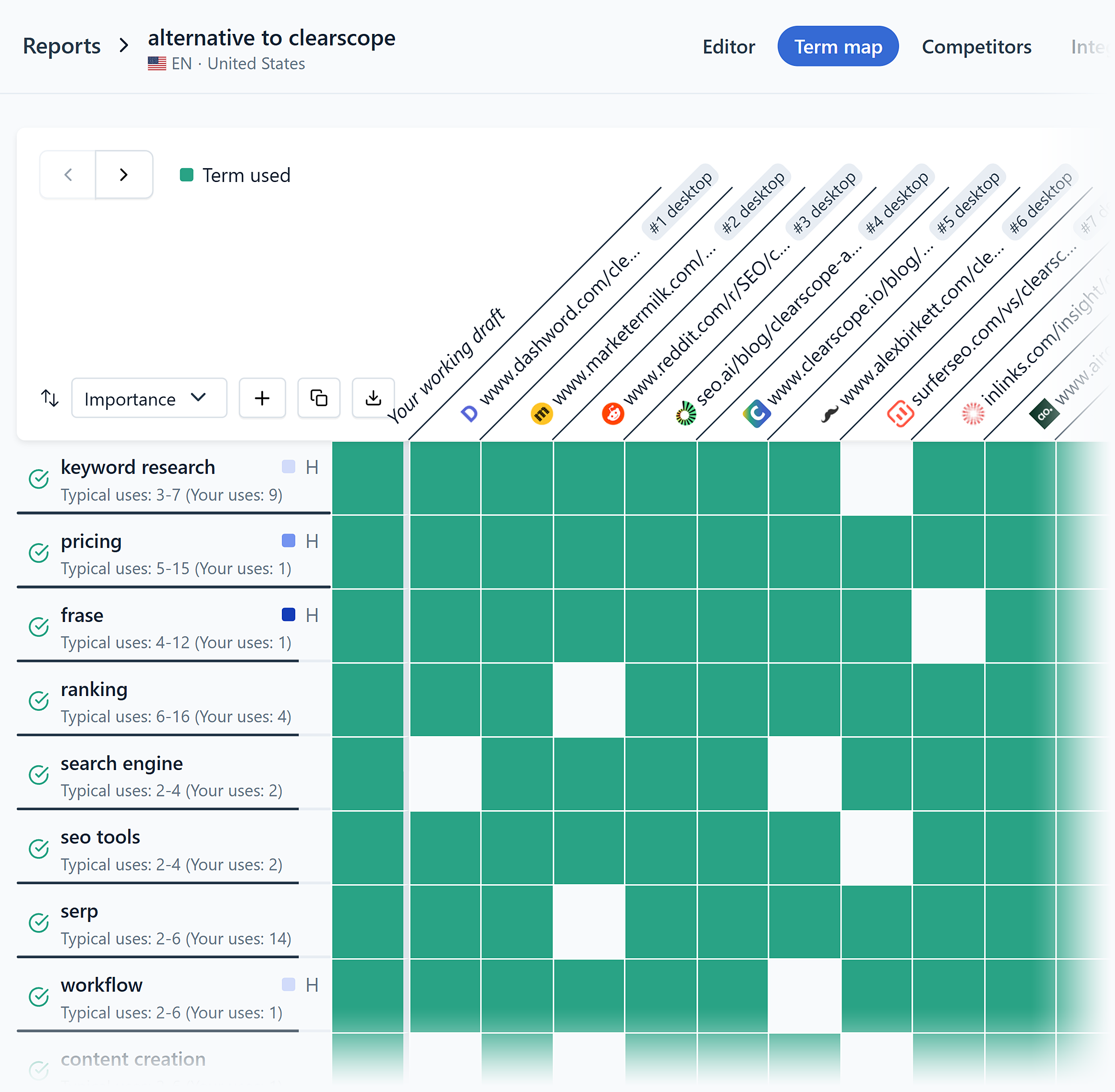
The Term Map visualizes the same data as a grid, making it easier to spot patterns across competitors at a glance, and includes position ranking data.
For ongoing audits, Clearscope’s Content Inventory connects to your Google Search Console property and imports your published pages.
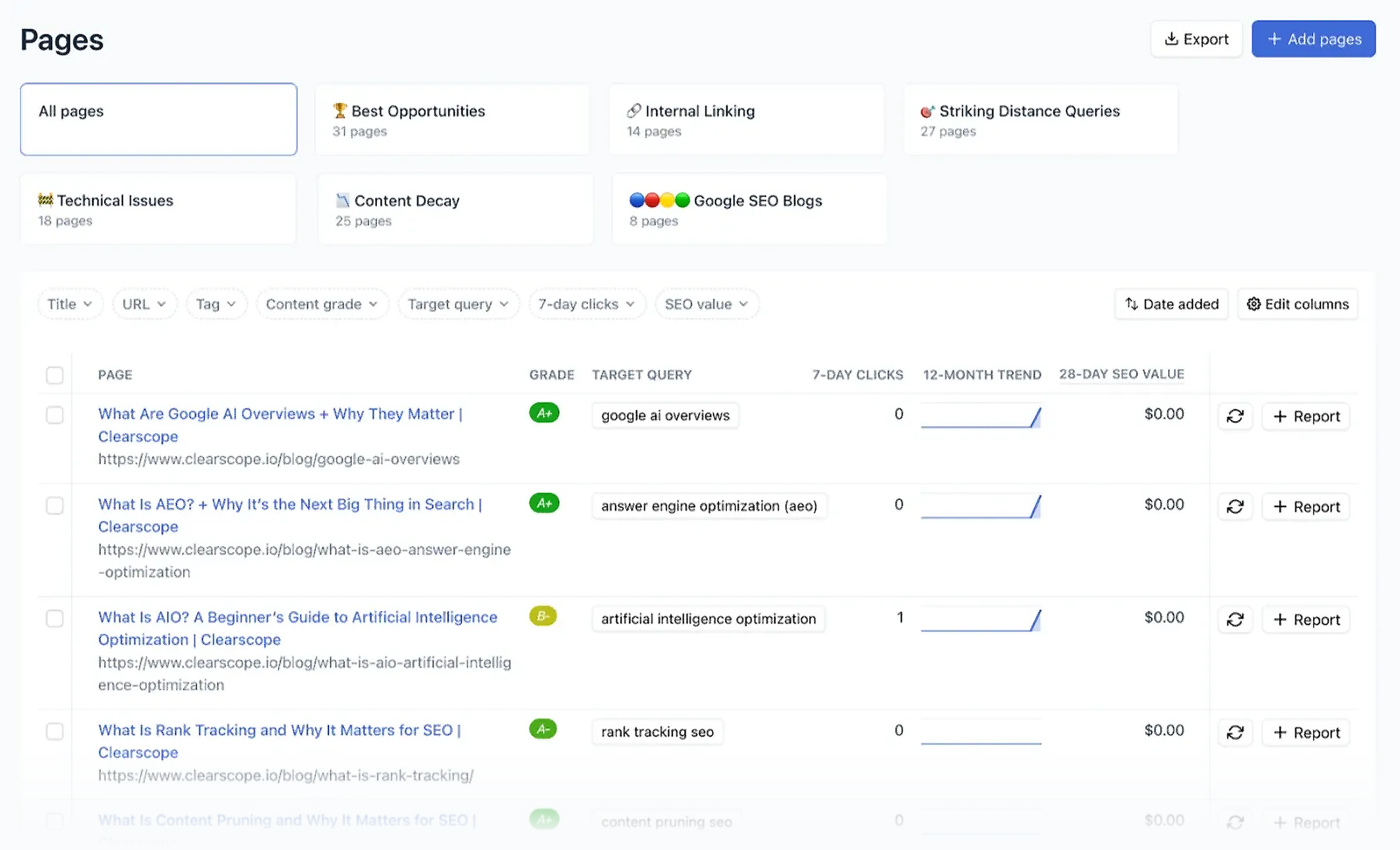
From there, it pairs GSC performance data — impressions, clicks, average position — with each page’s Clearscope grade, so you can see content quality and traffic side by side.
It also calculates an SEO Value for each page (GSC clicks multiplied by average CPC), which gives you a quick estimate of what that organic traffic is worth.
That’s useful when you’re deciding which pages to refresh first.
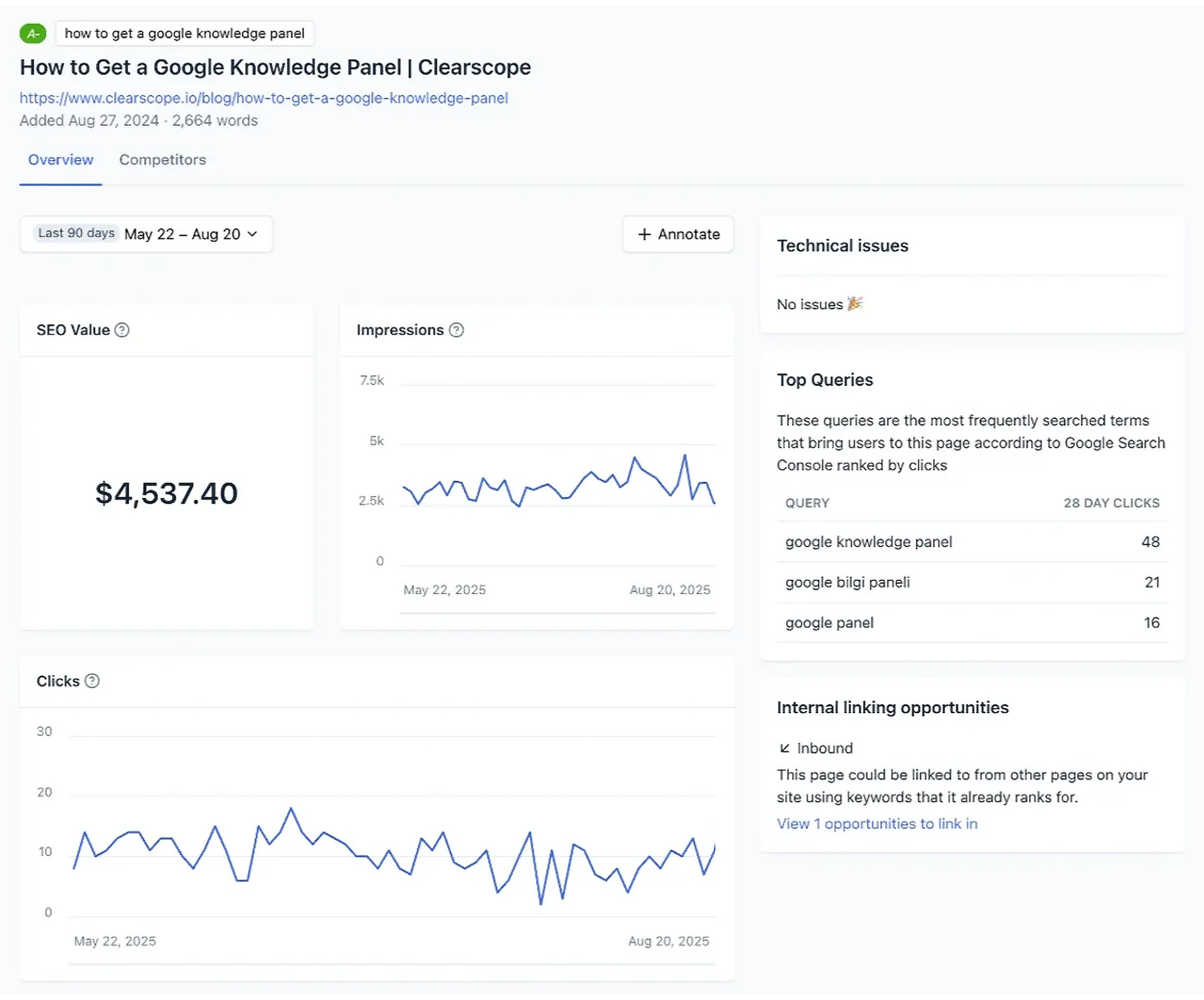
Content Inventory comes with pre-built views that sort your pages into different categories like “Striking Distance Queries,” “Technical Issues,” and “Internal Linking.”
The AI Cited Pages report shows which of your pages are cited by ChatGPT and Gemini and flags high-ranking pages that aren’t being cited at all.
You can also track topics across ChatGPT and Gemini to see when and how your brand gets mentioned.
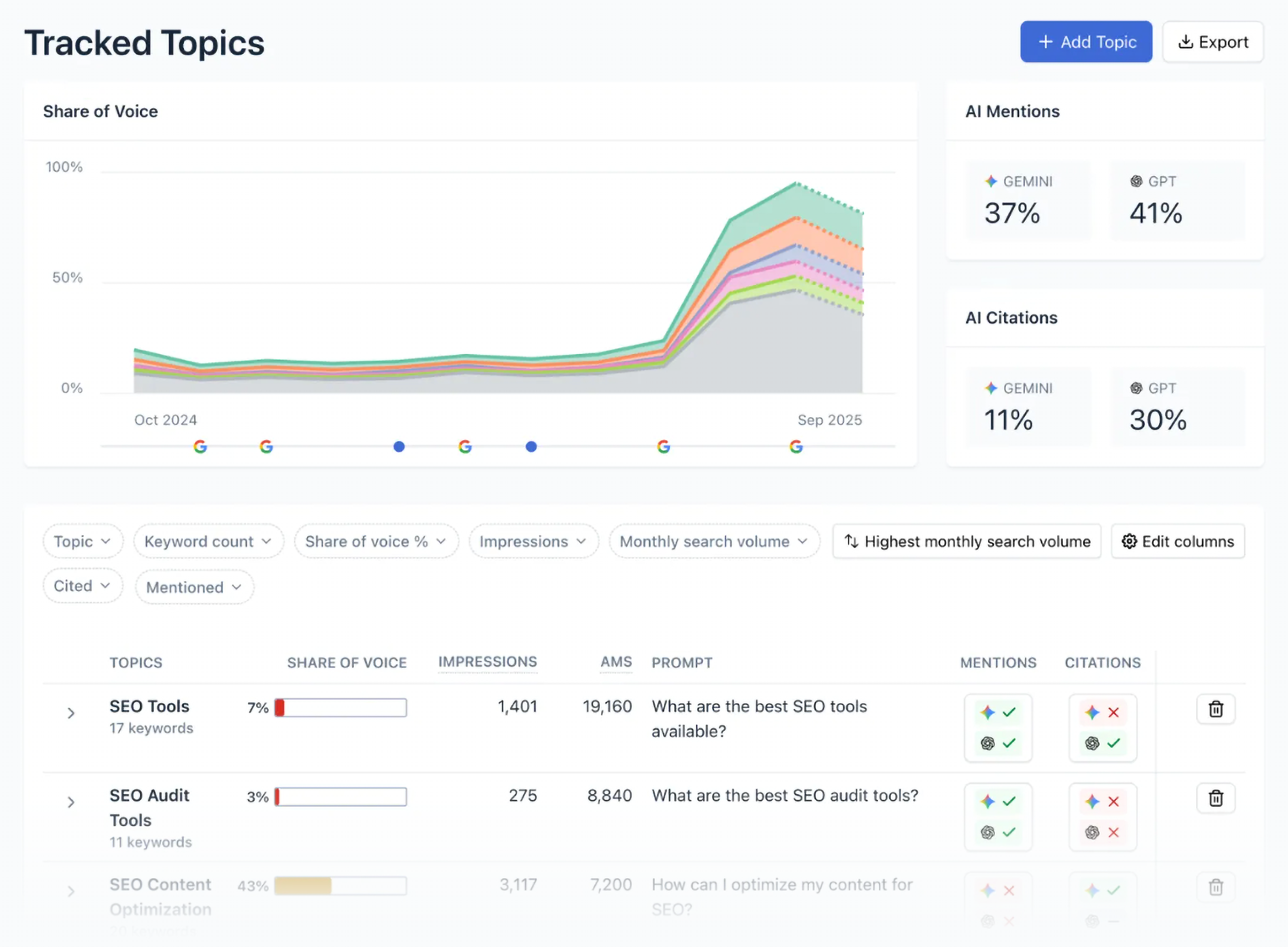
Learn your share of voice across AI platforms and which prompts surface for each topic, so you can use the data to prioritize content changes intended to improve visibility.
Pros and Cons
| Pros | Cons |
|---|---|
| Optimization, audits, AI visibility tracking, and brief templates all in one platform | Expensive for smaller teams (plans range from $129–$399/month) |
| Content Inventory makes ongoing content audits a structured process | Content grading may encourage keyword stuffing if you chase the score instead of writing naturally |
| Scans your content library for internal linking gaps and suggests anchor text | Content-focused only — no technical audit, backlink analysis, or rank tracking |
Ready, Set, Audit
A technically healthy site has always been important for rankings.
But now you’re competing for LLM visibility, too — and that means technical accessibility belongs in the audit too. AI systems can’t retrieve pages they can’t reach or parse.
These SEO audit tools help you get there.
Get started with a free Website Audit report that covers everything from on-page SEO to indexing problems.
Then, check out our technical SEO guide for a deeper look at the factors that affect how search engines and AI systems access your site.
Backlinko is owned by Semrush. We’re still obsessed with bringing you world-class SEO insights, backed by hands-on experience. Unless otherwise noted, this content was written by either an employee or paid contractor of Semrush Inc.