Backlinko readers get access for 14 days. 55+ tools.
FREE Google Search Profile Finder
Google Search profiles are public pages where creators, brands, and publishers showcase their work. Find yours, see whether you can claim it, and learn what to strengthen.
1. Search a name2. Pick the right match3. Copy or claim your URL
What This Tool Finds
How Search profiles actually work: three things worth knowing before you lean on your URL.
Your URL might not open yet
We generate the URL from Google's public entity ID. Google decides whether a live profile page exists for it.
Search profiles are not Business Profiles
This is for creators, publishers, people, and brands that appear in Google Search. It's not a replacement for a local Google Business Profile.
Finding the URL is only step one
If you're eligible, use Google's claim flow. Then keep your website, social profiles, schema, and public sources consistent.
No login, no manual lookup. Grab your direct profile link straight from Google's entity data.
Search by name, brand, or Knowledge Graph ID
Choose from up to 10 matching entities when your name isn't unique
Copy, open, or claim your profile link
Check Your Profile Eligibility
The eligibility checklist covers follower thresholds, platform requirements, and policy compliance so you know where you stand before you claim your profile.
Check the 100K follower threshold for YouTube, Instagram, and X
Check the 300K follower threshold for TikTok
Confirm US availability and age requirement
See whether a profile already exists for your entity
Review Your Entity Readiness
The entity readiness checklist flags gaps that affect how Google recognizes your brand.
Check website and social profile consistency across platforms
Review sameAs schema and profile-ready link opportunities
See Wikidata, Wikipedia, and source signal status
Get guidance on Knowledge Panel eligibility and status
Get Domain Visibility Data Alongside Your Profile Results
See how your domain performs in search, right alongside your profile results.
Check your Authority Score
View total ranking keywords and referring domains
Prioritize next steps with domain metrics
Want to Go Deeper? Track Your Visibility Across Search and AI
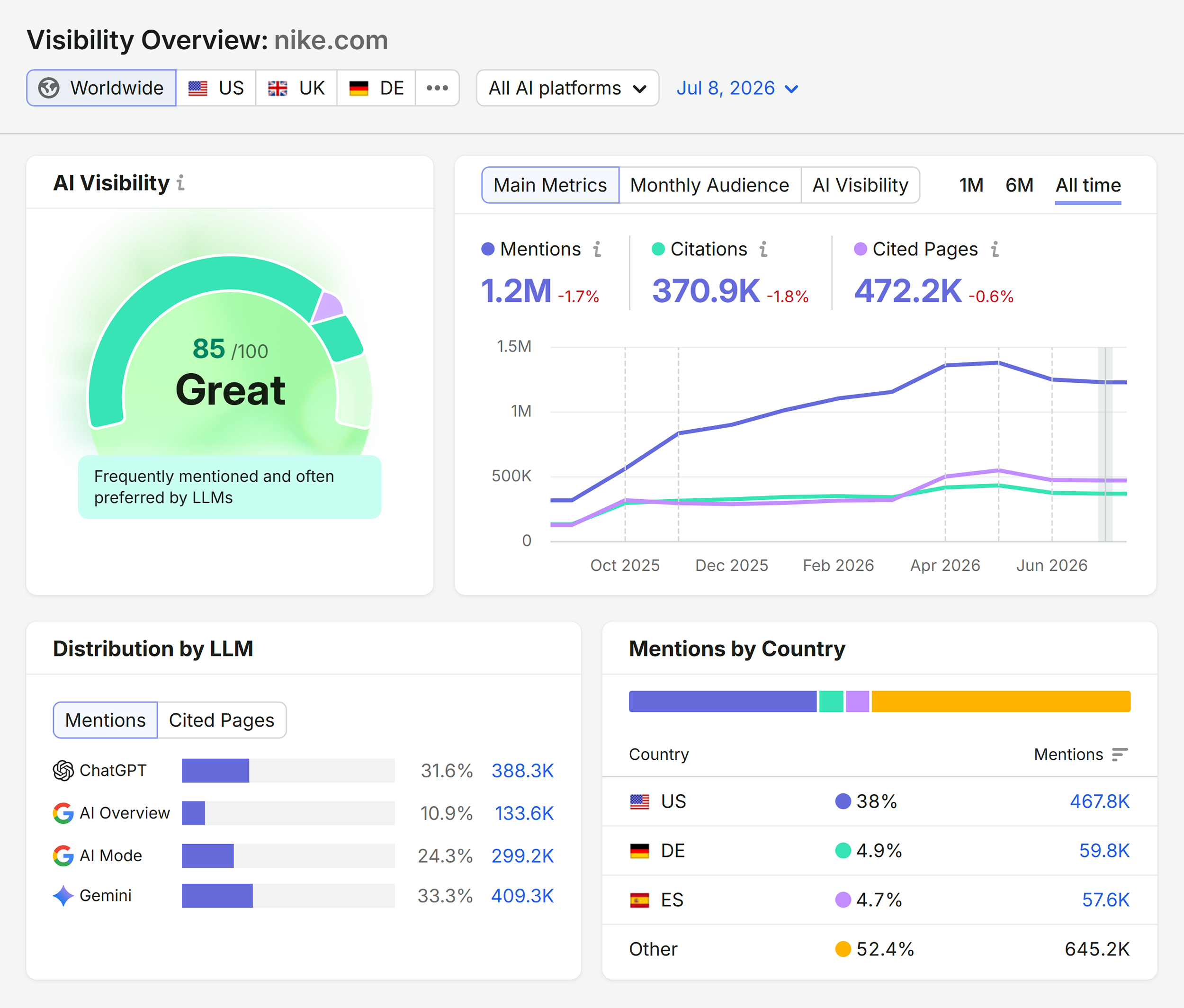
This free tool finds your profile. The Semrush AI Visibility Toolkit is where you track and grow it across search and AI.
Track brand mentions across ChatGPT, Google AI, and other AI platforms
Monitor competitor AI visibility and share of voice
See how your brand shows up in Google Search
Find the prompts and opportunities to grow your AI presence
Google Search Profile Finder FAQs
Yes the Google Search Profile Finder is free to use. No account or credit card required.
A Google Search profile is a dedicated, shareable space where eligible publishers and creators can highlight their articles, videos, social posts, websites, and links directly on Google Search. Google launched Search profiles in June 2026. They are distinct from Google Business Profiles and designed for individual creators and publishers, not local businesses.
Search profiles are currently available in the US for creators and publishers who meet Google’s eligibility requirements: you must be 18 or older, comply with Google’s content policies, and have a public profile with at least 100,000 followers or subscribers on YouTube, Instagram, or X, or at least 300,000 followers on TikTok. Creating a Search profile does not directly affect your Google Search ranking.
Google's Knowledge Graph is a database of entities (people, brands, companies, and organizations) and the relationships between them. Your Google Search profile is tied to your Knowledge Graph entity. A strong, well-established entity makes it easier for Google to surface your profile, recognize your brand across Search, and include you in AI-generated answers.
A Knowledge Panel is an information box that appears in Google Search results for notable entities. A Google Search profile is a separate, claimable page where creators and publishers can share their content directly on Search. Claiming a Search profile may trigger or enhance a Knowledge Panel for eligible publishers and creators, but it is not a replacement for a Knowledge Panel and does not guarantee one.
Entity readiness refers to how clearly Google can identify and understand your brand or identity as a distinct entity. Strong entity signals like consistent name, address, phone number (NAP) data, sameAs schema, social profile links, Wikipedia or Wikidata entries, and authoritative third-party mentions help Google connect your website, social profiles, and content to a single recognized entity in the Knowledge Graph. Weak entity signals make it harder for Google to associate your work with your profile.
No. The Google Search Profile Finder works without an account. Creating a free Semrush account gives you access to keyword research, backlink analytics, and an AI visibility score.
If you're eligible, click the Claim button within the tool to start the claim process. Add your website, social and video platform links, and profile-ready content. Share your profile URL across your owned channels so it accumulates engagement signals. Then use the entity readiness checklist in this tool to clean up any gaps in your schema, social profiles, or third-party source signals.
The Semrush Data Preview in the report includes gated AI Visibility and AI Citations metrics that show how your entity performs in AI-generated search answers. For deeper AI visibility tracking, including monitoring specific prompts, cited pages, sentiment, and competitor share of voice over time, use Semrush AI Visibility.
If no strong entity match exists for your search, the tool shows an entity-building checklist instead of a dead end. This covers the foundational steps for establishing a Knowledge Graph presence: consistent NAP data, sameAs schema markup, Wikipedia and Wikidata entries, and building authoritative backlinks and mentions across the web.